

Databricks Photon is worth turning on when a workload’s runtime falls by more than the DBU premium it carries. On scan-heavy, join-heavy and aggregation-heavy SQL or DataFrame work, that is often the case. On UDF-heavy, I/O-bound or small jobs, it often is not, because the premium rate applies whether or not Photon ends up accelerating the operators actually doing the work.
Photon ships as Databricks’ native vectorized query engine, a C++ runtime that replaces the JVM-based Spark SQL executor for the operators it supports, while Catalyst still plans the query. It’s enabled by default on classic all-purpose compute, classic jobs compute and classic Lakeflow pipelines, and it’s simply enabled, with no separate toggle, on serverless compute, SQL warehouses and serverless Lakeflow pipelines, per Databricks’ own documentation.
The friction shows up in the bill. Databricks Photon bills classic compute at a higher DBU rate than the same instance type running standard Spark, so the real question is whether it runs enough faster to clear a rate it pays on every core-hour, including the hours spent idle in a shuffle, rather than simply whether it runs faster in isolation.
What Is Photon in Databricks?
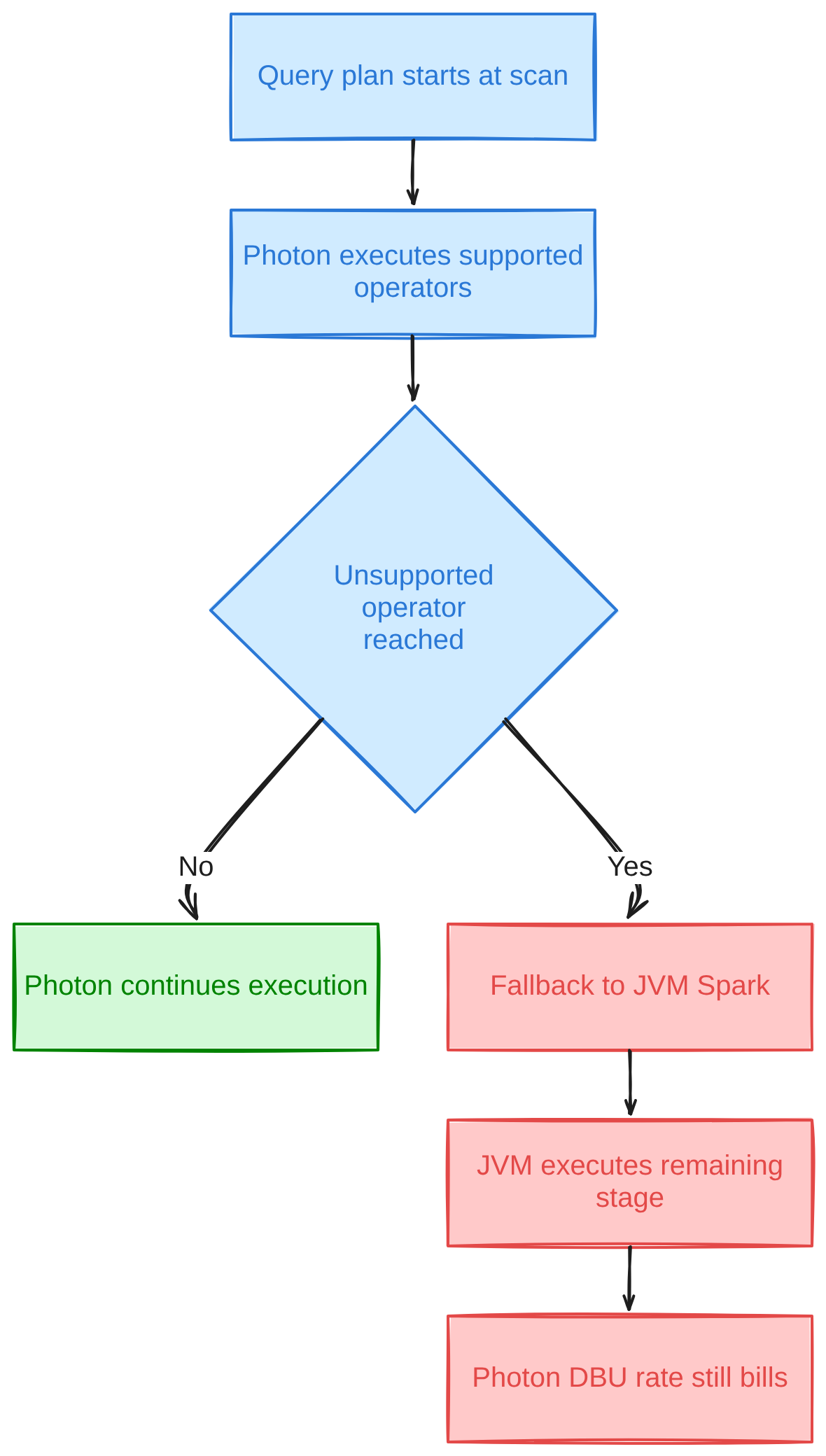
Photon is Databricks’ proprietary query engine: a vectorized C++ runtime written to replace the JVM-based Spark SQL executor for the subset of operators it implements, while the Catalyst optimizer still produces the physical plan Photon then executes against. Execution runs bottom-up starting at the scan, and Photon stays in control of the plan until it hits an operator it doesn’t implement, at which point control hands back to standard JVM Spark for that stage.
Databricks Photon is, in that sense, an execution-engine swap rather than a new API surface. Existing PySpark, Scala and SQL code runs unchanged; what changes underneath it is which runtime actually processes the columnar batches. The engine operates on batches of column-oriented data using SIMD instructions and native, off-heap memory rather than JVM heap objects, which is the architectural reason vectorized engines like this one tend to win on scan- and aggregation-shaped work and gain less on row-by-row logic.
Where Photon turns on is not a single switch. Default-on classic compute still lets you disable it per cluster; serverless compute, SQL warehouses and serverless Lakeflow pipelines ship with it simply enabled and non-optional, per Databricks’ current documentation.
1. Operators Photon executes natively
Parquet, Delta and CSV/JSON scans, hash-based aggregates, hash joins, shuffle operations, window functions and most scalar expression types run through Photon’s native operators when the cluster has Photon enabled. Delta and Parquet writes are included, which is part of why ingestion-heavy jobs that are mostly scan-and-write can see gains even without complex joins.
2. Operations that fall back to standard Spark
Python and Scala UDFs, the RDD and Dataset APIs, stateful streaming, and any expression Photon hasn’t implemented all fall back to the JVM engine. Because execution is bottom-up, Photon runs everything it can up to the first unsupported operator in the plan, then the rest of that stage runs on JVM Spark while the Photon DBU rate for the cluster keeps billing regardless of which engine actually did the work.
Databricks Photon Pricing: The DBU Rate Premium
Photon pricing works by charging a different DBU rate for the same compute rather than by adding a separate line item to the bill. On classic clusters, a Databricks Photon-enabled node of a given instance type consumes DBUs at a higher rate per hour than the identical instance type running standard Spark; the VM cost for that instance is unchanged either way, since that part of the bill goes to the cloud provider rather than Databricks.
Databricks said as much when Photon moved to public preview back in 2021: the DBU rate for Photon-enabled clusters differs from the standard rate for the same instance type, and SQL endpoints included Photon at no extra cost from day one. The exact current multiplier isn’t something this piece will pin down: Databricks’ published rates are only available on its live pricing calculator, which this research could not confirm against a static page fetch, and the ratio likely varies by cloud, region and instance family. Treat any specific multiplier you see quoted elsewhere as a snapshot rather than a rate card, and check Databricks’ own pricing page before budgeting a migration.
Databricks Photon pricing, in other words, is a rate change layered on top of the usual instance cost rather than a new category of spend. SQL warehouses and serverless compute fold that rate into their published per-DBU price with no separate Photon line to evaluate, since Photon isn’t optional there. On classic jobs and all-purpose compute, the premium is the thing you’re actually deciding to accept when you leave “Use Photon Acceleration” checked.
Does Databricks Photon Increase Cost?
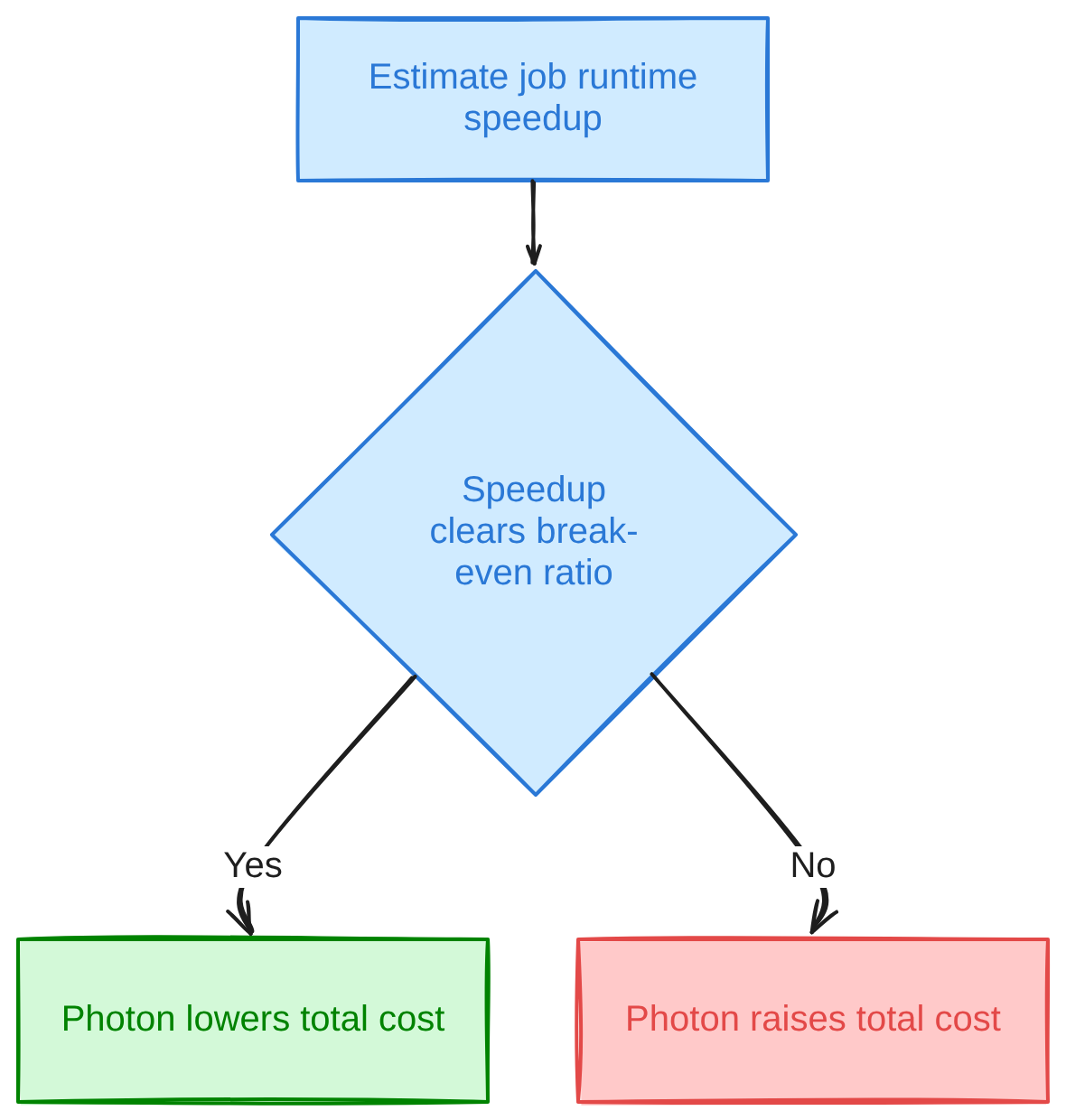
Per hour, yes. Databricks Photon’s higher DBU rate on classic compute is unconditional, charged whether or not the operators in a given stage actually run through the vectorized engine that hour. Per job, it depends entirely on how much that job’s runtime drops, because the premium only pays for itself if the job finishes enough sooner to offset the rate increase.
Related Read: How to Reduce Databricks DBU Costs in 2026
The break-even condition is a ratio rather than a fixed number, because the unchanged VM cost dilutes the DBU premium’s effect on the total hourly rate. An independent analysis of 271 AWS instance types in us-east-1 estimated the resulting break-even speedup at 1.50x to 1.90x, with a median around 1.71x, well under the naive assumption that a doubled DBU rate needs a doubled speedup to pay back. A separate illustrative example table in the same piece, built from list prices across AWS, Azure and GCP, put Jobs compute on AWS m5d.2xlarge at roughly 1.59x and GCP Jobs compute on n2-standard-8 at roughly 1.54x.
The formula behind that is simple enough to work through with illustrative numbers:
Illustrative break-even check (figures below are illustrative,
not an official Databricks DBU rate):
standard cost/hour = (standard DBU/hr x $/DBU) + VM $/hr
photon cost/hour = (photon DBU/hr x $/DBU) + VM $/hr
break-even speedup = photon cost/hour / standard cost/hour
VM cost: $1.00/hr (unchanged by Photon on classic compute)
standard DBU line: 1.0 DBU/hr x $0.15/DBU = $0.15/hr -> $1.15/hr total
photon DBU line: 2.0 DBU/hr x $0.15/DBU = $0.30/hr -> $1.30/hr total
break-even speedup = 1.30 / 1.15 = 1.13x
A job that would otherwise run 60 minutes only needs to finish in about 53 minutes on Photon to come out even on cost in that illustration. Any Databricks Photon cost estimate that ignores the unchanged VM line and just doubles the DBU rate will overstate the premium and undersell how often Photon actually clears it.
There’s a second, quieter cost risk: Photon fallback on classic compute is, in the words of one community thread on the subject, basically invisible in the UI. A cluster can keep billing the Photon rate while a meaningful share of a job’s plan quietly runs on the JVM underneath it, and Databricks’ own tooling has no first-class metric that flags this on classic compute.
Photon vs Spark: Where the Two Diverge
Databricks Photon vs Spark comparisons tend to conflate two separate things: a new execution engine bolted onto the same Spark APIs, and a new cost rate bolted onto the same cluster. The table below separates the two.
| Dimension | Photon | Standard Spark (JVM) |
|---|---|---|
| Engine | Native C++ vectorized runtime | JVM-based Spark SQL executor |
| Language/runtime | Columnar, SIMD-vectorized, off-heap memory | Row- and columnar-mixed, on-heap JVM objects |
| Operator coverage | Scans, hash joins/aggregates, shuffle, window functions, most scalar types | Full Spark operator set, including everything Photon doesn’t implement |
| UDF handling | Python/Scala UDFs fall back to JVM mid-plan | Native; UDFs run without an engine handoff |
| Where it runs | Default-on classic compute; mandatory on serverless, SQL warehouses, serverless Lakeflow | Available wherever Photon is unchecked or unsupported |
| Cost model | Higher DBU rate per hour on classic compute | Standard DBU rate for the same instance type |
| Portability | Databricks-proprietary, not available outside the platform | Open-source Apache Spark, portable to any Spark runtime |
Query planning doesn’t change between the two rows. Catalyst still produces the physical plan either way; Photon’s contribution is which engine walks that plan and executes each node.
Photon Performance: What the Benchmarks Show
Databricks Photon performance figures published by Databricks itself describe a 2x speedup on the TPC-DS Power Test at 1TB scale factor against Databricks Runtime 8.0 without Photon, according to Databricks’ 2021 announcement of the public preview. That’s a controlled, single-benchmark figure rather than a general-purpose multiplier.
Databricks’ current product page for Photon goes further, stating customers “have observed 3x-8x speedups on average” against recent runtime versions based on their own workloads, and claiming up to 12x better price/performance against other cloud data warehouses and up to 80% total cost of ownership savings, without a published per-query breakdown behind either figure. Early private-preview customers in the 2021 announcement separately reported 2-4x average speedups on SQL workloads under real conditions, a different and lower number than the controlled TPC-DS result.
None of those figures transfer cleanly to an arbitrary job. A workload dominated by UDFs, small files, or non-Delta streaming sinks won’t see anything close to 3x, because the operators doing most of the work never touch Photon’s native runtime in the first place. The only reliable way to know a given job’s number is to run it: the same job on a Photon-enabled cluster and on an otherwise identical non-Photon cluster, comparing wall-clock runtime, DBUs consumed and total cloud cost rather than runtime alone.
When to Use Photon: Databricks Workloads Where It Pays Back
Photon tends to pay back on workloads where most of the plan is scans, joins, aggregations and window functions over Parquet or Delta data, since those are exactly the operators Photon implements natively. It tends not to pay back where UDFs, RDD code, or unsupported expressions dominate the plan, since those stages run on the JVM anyway while still billing the Photon rate.
A short list of where each case tends to land:
- Pays back: large aggregations and group-bys, multi-way hash joins, window-function-heavy analytics, Delta/Parquet-to-Delta ETL with little custom row logic, SQL warehouse and BI query workloads where Photon is mandatory anyway.
- Rarely pays back: jobs dominated by Python or Scala UDFs, RDD/Dataset-API pipelines, stateful streaming to non-Delta sinks, small or short-lived jobs where cluster startup dwarfs execution time, and jobs already I/O-bound on a slow upstream source rather than CPU-bound on compute.
- Worth A/B testing either way: mixed pipelines with a few heavy UDF stages inside an otherwise scan-and-join-heavy plan, since the break-even math depends on what share of total runtime those UDF stages actually consume.
Related Read: Databricks Cost Optimization: Practical Strategies
Checking Photon Coverage and Turning Photon Off for Specific Jobs
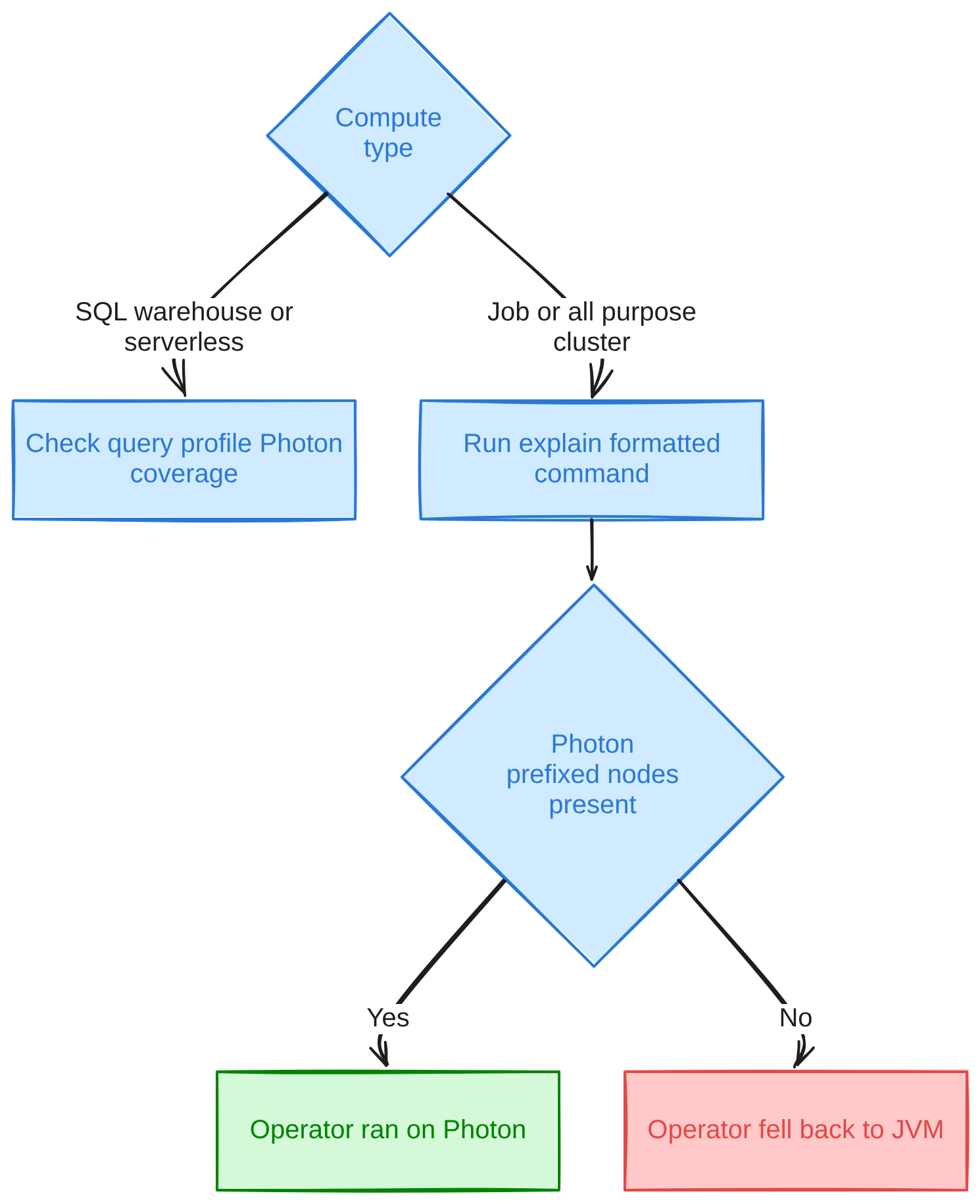
Checking Photon coverage means reading the physical plan to see which operators actually executed on the vectorized engine versus which fell back to the JVM, since there’s no single dashboard metric that states a fallback percentage on classic compute. The query profile on SQL warehouses and serverless compute does surface Photon task-time coverage per query, which practitioner write-ups describe as a percent-of-task-time-in-Photon figure and the most direct signal available there.
On job and all-purpose clusters, the more reliable check is the plan itself:
EXPLAIN FORMATTED
SELECT customer_id, sum(amount)
FROM orders
GROUP BY customer_id;
-- Node names prefixed "Photon" (PhotonGroupingAgg, PhotonShuffleExchangeSink)
-- ran on the vectorized engine; plain JVM node names (HashAggregate,
-- ColumnarToRow) mark where execution handed back to standard Spark.
The same read applies to df.explain(mode="formatted") in PySpark. A BatchEvalPython or ArrowEvalPython node in that output marks a UDF stage that forced a round trip out of Photon and back.
Photon selection happens when a cluster is created, either through the “Use Photon Acceleration” checkbox or the runtime_engine field on the Clusters/Jobs API, rather than through a Spark conf you can toggle at runtime, and it can’t be flipped mid-session:
{
  "new_cluster": {
    "spark_version": "15.4.x-scala2.12",
    "runtime_engine": "PHOTON",
    "node_type_id": "i3.2xlarge",
    "num_workers": 4
  }
}
To turn Photon off for a specific job, point that job at a separate cluster definition with runtime_engine omitted or set to "STANDARD", rather than trying to disable it inside a running session.
Troubleshooting Photon Fallback and Hidden Premium Costs
Most Photon cost surprises trace back to one of a small number of fallback patterns, each visible in the plan if you know where to look. The table below is a quick index; the sections after it go deeper on each.
| Symptom | Likely cause | First fix |
|---|---|---|
| BatchEvalPython / ArrowEvalPython node mid-plan | Python or Scala UDF | Rewrite as a native SQL/Photon-supported expression, or accept the fallback cost |
| UNSUPPORTED_UDF_FEATURE at registration | UDF uses a feature the runtime or compute type doesn’t support | Check the sub-condition and switch compute type or runtime accordingly |
| Job bills Photon rate but runs no faster than expected | Silent mid-plan fallback with no dashboard warning | Read the explain plan directly; there’s no first-class fallback metric on classic compute |
| Streaming job to Kafka/JDBC slower than a Delta-sink equivalent | Non-Delta streaming sink forces fallback on write | Write to Delta where possible, or budget for the non-Photon write cost |
| Spilling or OOM on a job that ran fine pre-Photon | Off-heap vector buffers need extra headroom | Add 20-30% memory headroom or move to a memory-optimized instance family |
1. Python and Scala UDFs forcing an operator back to the JVM
A BatchEvalPython or ArrowEvalPython node appearing mid-plan marks a UDF forcing an Arrow-encoded round trip between the C++ engine and the Python or JVM process running the UDF body. Confirm it with df.explain(mode="formatted") or EXPLAIN FORMATTED and look for that node name specifically. Pandas UDFs reduce the per-row serialization overhead of that round trip but still execute outside Photon entirely, so they soften the penalty without removing it. The durable fix is pushing the logic into a native SQL or built-in expression Photon already implements, where that’s feasible.
2. Silent fallback with no dashboard warning on classic compute
A cluster can keep billing the Photon DBU rate while a meaningful share of a job’s plan runs mid-plan ColumnarToRow/RowToColumnar conversions back to the JVM, triggered by things like certain struct and array predicates or specific Delta features. One community write-up on the subject built a custom QueryExecutionListener reading executedPlan to flag BatchEvalPython nodes and mid-plan columnar conversions, deliberately ignoring the benign ColumnarToRow node that normally terminates a plan. There’s no equivalent tool shipped by Databricks for classic compute as of this writing, which makes this the hardest fallback pattern to catch without instrumenting the plan yourself.
3. UNSUPPORTED_UDF_FEATURE at registration time
This one is a hard registration-time error rather than a silent fallback: the error class is UNSUPPORTED_UDF_FEATURE, SQLSTATE 0A000, with the message template “The function <function> uses an unsupported feature.” Sub-conditions include SECRETS_NOT_SUPPORTED_ON_DEDICATED_COMPUTE, which means switching the job to serverless or shared compute, and LEGACY, which means the UDF needs a newer Databricks Runtime version. Because it blocks the UDF outright rather than letting it run at the Photon billing rate, it’s a correctness problem more than a cost one, but it’s worth knowing the error class name so it doesn’t get mistaken for a fallback.
4. Non-Delta streaming sinks breaking Photon on writes
Streaming jobs writing to Kafka, JDBC or arbitrary foreach sinks fall back on the write side, along with stateful streaming operators generally. Confirm it by checking the physical plan around the sink stage for JVM-colored or non-Photon-prefixed node names rather than assuming the whole pipeline ran vectorized just because the reads did. Where the target can be Delta instead, routing through a Delta sink keeps the write path inside Photon; where it can’t, the honest move is budgeting the job at the standard, non-accelerated write cost.
5. Memory pressure from Photon’s off-heap vector buffers
Jobs that ran cleanly before Photon can start spilling or hitting out-of-memory errors afterward, because Photon’s columnar vector buffers sit off-heap and need their own headroom rather than sharing the JVM heap’s existing allocation. Stage-level spill metrics in the Spark UI are the first place to confirm it. One practitioner write-up on running Photon in production suggests 20-30% extra memory headroom or a memory-optimized instance family such as r5, r6g or Eav5 as a first fix; treat that range as a starting point to test against a given job’s actual spill behavior rather than a guaranteed number.
Open-Source Alternatives to Photon’s Vectorized Execution
Photon is one of several vectorized execution engines built to sit under unchanged Spark code, and it’s the one tied to a single vendor’s billing. Apache Gluten offloads Spark SQL’s JVM execution to a native engine, commonly Velox, by translating Spark’s physical plan into a Substrait plan and returning results as Arrow-formatted columnar batches. The Apache Software Foundation board approved it as a top-level project in February 2026, with the move announced the following month, and per the project’s own site it requires no changes to existing Spark DataFrame or SQL jobs to adopt.
Apache DataFusion Comet takes a similar approach with a different native runtime: it intercepts the physical plan and executes supported operators through the Rust-based DataFusion engine, keeping data in Arrow columnar format through scan, shuffle and broadcast. As of its 1.0.0 release it supports Apache Spark 3.4 through 4.1, with experimental 4.2 support, and reads Parquet and Iceberg natively rather than through the JVM. Both projects follow the same general model as Photon: swap the execution engine underneath unchanged Spark code. Neither publishes a Databricks-comparable price, because neither is billed by its maintainer at all; they’re Apache-licensed software run on infrastructure paid for separately.
Yeedu Turbo: Vectorized Spark Execution Without a DBU Premium
Yeedu’s Turbo engine is a C++ vectorized execution layer that runs existing PySpark jobs unchanged, the same swap-the-engine-underneath model as Photon, Gluten and Comet. On CPU-bound work (joins, aggregations and multi-stage transforms, roughly 30-40% of a typical job mix), Yeedu reports 4-10x faster execution and 60-80% lower compute cost.
Yeedu speeds up the rest of the workload too. Turbo runs multi-threaded and keeps every available core working in parallel regardless of workload shape, and Yeedu’s Smart Scheduling packs tasks into idle CPU windows during read/write waits, which Yeedu reports as 2-4x higher cluster efficiency on ingestion, ELT and streaming jobs. Spark-submit multiplexing runs many jobs inside one shared, long-lived session so later jobs reuse what earlier ones already cached, and a Turbo Parquet disk cache serves repeat reads of the same files from local disk instead of object storage. No speedup figure is published for either of those last two mechanisms; they’re described here as capabilities rather than multipliers.
The pricing structure is where the DBU question above stops applying. Yeedu runs on a fixed annual licence at a flat rate for unlimited usage rather than a per-core, per-hour or per-job charge, so turning Turbo on for a job doesn’t carry a per-DBU premium to break even against in the first place; the licence cost is already fixed regardless of how much the engine is used that month. Yeedu's TPC-DS benchmark run, 99 of 99 queries completed, at $0.52 for 1TB and $2.33 for 3TB of compute cost on that benchmark page, which is a synthetic decision-support benchmark and a measure of that specific run’s compute cost rather than a general price per terabyte.
Yeedu runs inside the customer’s own cloud account or on-premises infrastructure and reads Unity Catalog, Hive Metastore and AWS Glue in place through a federated layer, rather than requiring metadata to move anywhere. That makes adoption a per-job decision rather than a platform decision: a team can point specific jobs at Turbo while everything else on the estate keeps running exactly where it already runs.
Conclusion
Photon’s value case always resolves to the same arithmetic: does the runtime drop by more than the DBU premium, net of the VM cost that doesn’t change. The same break-even logic applies to any engine built on the swap-the-runtime idea, open-source or licensed.
- Photon is default-on for classic all-purpose and jobs compute, and mandatory (non-optional) on serverless compute, SQL warehouses and serverless Lakeflow pipelines.
- It accelerates scans, hash joins/aggregates, shuffle and window functions; it falls back to the JVM for UDFs, RDD/Dataset code and unsupported expressions.
- The cost question is per-job rather than per-cluster: Photon’s classic-compute DBU rate is higher regardless of whether a given stage actually runs vectorized.
- Independent analysis puts the real break-even speedup around 1.5x-1.9x rather than the naive 2x, because the unchanged VM cost dilutes the DBU premium.
- There’s no first-class fallback metric on classic compute; the explain plan and query profile are the tools that actually show coverage.
- Apache Gluten and Apache DataFusion Comet offer the same engine-swap model as open-source alternatives, without a vendor DBU rate attached.
FAQs
Is Photon enabled by default in Databricks?
Yes, on classic all-purpose compute, classic jobs compute and classic Lakeflow pipelines, Photon is on by default unless a cluster is explicitly configured otherwise. On serverless compute, SQL warehouses and serverless Lakeflow pipelines it’s mandatory as well as default, with no documented way to turn it off.
Does Photon work with PySpark UDFs?
No, not natively. Photon doesn’t execute Python or Scala UDF bodies itself; the UDF operator runs on the JVM or Python side while Photon-compatible operators elsewhere in the same query keep running in Photon. Pandas UDFs reduce serialization overhead compared with scalar Python UDFs but still execute outside the Photon engine entirely.
How much faster is Photon than standard Spark?
Databricks’ own TPC-DS 1TB benchmark measured up to 2x against Databricks Runtime 8.0 without Photon, under controlled conditions. Databricks separately states customers have observed 3x-8x on average against recent runtime versions, and early preview customers reported 2-4x on real SQL workloads; all three are different measurements under different conditions, so none substitute for testing a specific job.
How do I check whether a query ran on Photon?
Use the query profile’s Photon task-time coverage, which practitioners describe as a percent-of-task-time-in-Photon figure, on SQL warehouses and serverless compute, or read the physical plan directly on job and all-purpose clusters. EXPLAIN FORMATTED or df.explain(mode="formatted") show Photon-prefixed node names like PhotonGroupingAgg where Photon executed, versus plain JVM node names like HashAggregate where it fell back.
Can I turn Photon off for specific jobs?
Yes, but only at cluster-creation time rather than mid-session. Set the runtime_engine field to "STANDARD" (or leave the “Use Photon Acceleration” box unchecked) on a separate cluster definition and point that specific job at it, since Photon is a runtime selection made when a cluster is created rather than a Spark conf you can flip at runtime.
Is Photon available on Databricks Jobs compute?
Yes, Photon is available and enabled by default on classic Jobs compute, selectable via the same checkbox or runtime_engine: "PHOTON" API field used on all-purpose clusters. It can be disabled per job cluster definition if a specific job’s workload doesn’t clear its break-even speedup.
Is there an open-source alternative to Photon?
Yes. Apache Gluten offloads Spark SQL execution to a native engine, commonly Velox, via a Substrait plan translation; the Apache Software Foundation board approved it as a top-level project in February 2026, with the move announced in March. Apache DataFusion Comet does the equivalent through the Rust-based DataFusion engine and supports Spark 3.4 through 4.1. Both require no code changes to adopt and carry no vendor-specific billing rate.