

Running Apache Spark workloads efficiently means matching resources to the work in front of you, cutting the volume of data a job moves and scans, and keeping executors busy rather than idle. Most of the waste on a Spark bill traces back to a short list of causes: oversized or idle clusters, shuffles and skew, poor file layout, memory settings copied from a different job, and one configuration applied across workloads that behave nothing alike.
None of that is exotic once the mechanics are visible. A driver coordinates a directed acyclic graph of stages, executors run tasks against partitions of that data, and every wide transformation, a join, a groupBy, a repartition, forces a shuffle that touches disk, the network and serialization all at once. Tune the handful of levers that control those mechanics and Apache Spark workloads get faster and cheaper without a single change to business logic.
This guide walks through the execution model, the Spark UI signals that reveal waste, the code and configuration changes that address it, and the cluster-management choices that determine whether a fix sticks. It closes with a troubleshooting table tying literal error strings to root causes and fixes, and a short checklist for tuning a job already in production.
How Spark Job Execution Works
Executing a Spark job starts with a driver process running the application’s main() function and creating the SparkContext, which must stay network-addressable by every executor for the life of the application, per Spark’s cluster-mode overview documentation. Executors are per-application processes that run tasks across multiple threads and stay alive for the whole application. They cannot share data between separate applications without going through external storage, which is why a shared cache inside one Spark application cannot help a second, unrelated application.
An action on a DataFrame or RDD triggers a job: “a parallel computation consisting of multiple tasks.” The scheduler breaks that job into stages, sets of tasks that depend on each other, and each stage fans out into individual tasks, units of work sent to one executor. The stage boundary is the detail that matters for efficiency in Apache Spark workloads. Narrow transformations, a filter, a map, a column projection, run inside the same stage because each output partition depends on exactly one input partition. Wide transformations, a groupByKey, a reduceByKey, a join on differently-partitioned data, require an all-to-all shuffle: every output partition can depend on data from every input partition, so Spark has to write shuffle files, move them across the network, and read them back on the other side. That shuffle is where disk I/O, serialization cost and network time concentrate, and it’s the first place to look when a job is slow rather than merely busy.
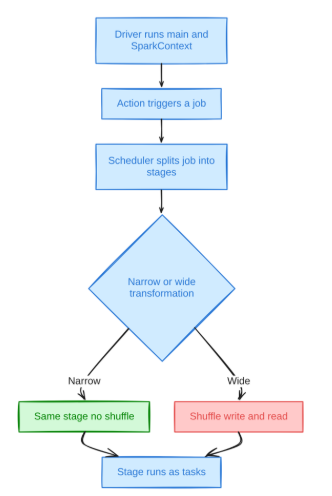
Repartitioning, coalesce, and most joins and aggregations sit on one side or the other of that boundary. Knowing which operations trigger a shuffle, and which just rearrange work inside an existing stage, is most of what separates a job that scales linearly with data volume from one that falls over on a 10x input.
Measuring Spark Performance Before You Tune It
Measuring Apache Spark workloads before tuning them matters, because a config change applied without a baseline is a guess dressed up as a fix. The Spark UI’s Stages tab and the Spark History Server, which replays event logs after a job finishes, are the two places that data lives.
A few signals are worth reading on every slow stage:
- Task duration distribution: The Stages tab shows min, median, and max task duration per stage. A wide spread, a handful of tasks running ten times longer than the median, almost always means skew: a few partitions hold far more data or far hotter keys than the rest.
- Shuffle read/write size and fetch wait time: The UI’s shuffle metrics report total shuffle bytes read, local and remote combined, plus the time tasks spent blocked waiting on remote shuffle data. A stage with short compute time but a long shuffle-read-fetch-wait is network- or scheduling-bound, not CPU-bound.
- Spill to memory and spill to disk: These metrics show the deserialized size of shuffled data held in memory versus the serialized size once it overflows to disk. Any nonzero disk spill on a stage means that stage asked for more execution memory than it was given, and Spark paid a serialization and disk-I/O tax to keep going instead of failing.
- GC time per task: Apache Spark workloads lose real throughput to garbage collection long before an executor actually fails. The task table’s GC Time column shows total JVM garbage-collection time per task. Spark’s tuning guide puts it plainly: if a full GC runs several times before a task completes, there isn’t enough memory available to execute it.
- Executor add/remove events and peak memory: The Executors tab exposes when executors joined or left and their peak memory, which is how you confirm, after the fact through the History Server, whether a stage failed because of an out-of-memory kill or a spot interruption.
None of these signals require guessing. Each one points at a specific fix, covered in the troubleshooting table near the end of this piece. The discipline that actually moves the needle on Spark workload optimization is reading the UI stage-by-stage instead of tuning the whole job on a hunch.
Workload Classes and Why They Need Different Treatment
Not every Spark job wastes compute the same way, and a fix that helps one workload class can do nothing for another. Batch ETL, scheduled, bounded jobs that read a day’s partition and write a transformed table, are usually I/O- and shuffle-bound: the win is in file layout, partition pruning and shuffle-partition sizing, not raw CPU throughput. Interactive and ad hoc SQL, the queries a BI tool or notebook fires against a warehouse table, live and die on broadcast join thresholds and caching, because the same scan gets repeated by different users against the same data minutes apart.
Streaming jobs carry a constraint neither batch nor interactive jobs have: checkpoint reliability, because a lost checkpoint forces full reprocessing and burns the exact compute the rest of this guide is trying to save. ML feature-prep jobs tend to be CPU-bound instead, dominated by joins, aggregations and multi-stage transforms rather than raw I/O.
In practice, a single cluster profile, one executor shape, one shuffle-partition count, one caching policy, rarely serves all four classes well. A cluster sized for a shuffle-heavy nightly ETL job is oversized and idle for an interactive SQL session, and a cluster tuned for low-latency queries under-provisions memory for a batch job with a 500GB shuffle. Matching the cluster and the configuration to the workload class in front of you, rather than running one shape everywhere, is where a meaningful share of Spark workload optimization work actually happens.
Apache Spark Performance Optimization at the Code Level
Apache Spark performance optimization at the code level starts with staying on the Catalyst-optimized DataFrame and SQL APIs instead of the RDD API, because Catalyst can push down predicates, prune columns and reorder joins only when it can see the computation as a declarative plan. Once that baseline is in place, a short list of patterns accounts for most avoidable cost.
1. DataFrame and SQL over RDDs and Python UDFs
The RDD API hides the computation from Catalyst’s optimizer, so operations that could be fused, pushed down or reordered run exactly as written instead. Python UDFs make it worse: each row crosses the JVM-to-Python boundary through serialization, so a job built around row-at-a-time udf() calls pays that tax on every row. Pandas UDFs (@pandas_udf), which batch rows through Arrow before crossing into Python, and Spark’s built-in SQL functions, which never leave the JVM, both avoid that cost.
2. Early filtering and projection
Pushing a filter or column selection as close to the read as possible lets predicate and projection pushdown eliminate rows and columns before they’re ever shuffled or joined, shrinking every downstream stage. For a columnar format like Parquet, projection pushdown also means columns that aren’t referenced are never read off disk.
3. Broadcast joins
spark.sql.autoBroadcastJoinThreshold defaults to 10485760 bytes, 10MB, below which Spark broadcasts the smaller side of a join to every executor instead of shuffling both sides. Raising that threshold for a dimension table a bit larger than 10MB can turn an expensive sort-merge join into a broadcast join with no shuffle at all. spark.sql.broadcastTimeout defaults to 300 seconds; a broadcast that doesn’t finish in that window raises Could not execute broadcast in 300 secs rather than silently falling back. Setting the threshold to -1 disables broadcast joins entirely, sometimes the safer choice than letting Spark guess.
4. Avoiding collect() on large results
spark.driver.maxResultSize defaults to 1g and aborts the job once collected results exceed it, surfacing as Total size of serialized results of N tasks (size) is bigger than spark.driver.maxResultSize (limit). That failure is Spark protecting the driver from an out-of-memory crash. The fix is almost never to raise the limit; it’s to stop pulling the full result set into driver memory and write it to storage instead.
5. Caching only reused data
.cache() or .persist() only pays off when the same DataFrame feeds more than one downstream action. Caching something read once is pure overhead: it occupies the unified memory region, described below, that execution could otherwise use, and calling .unpersist() once the reuse window closes gives that memory back instead of letting it sit until the application ends.
Adaptive Query Execution and Its Limits
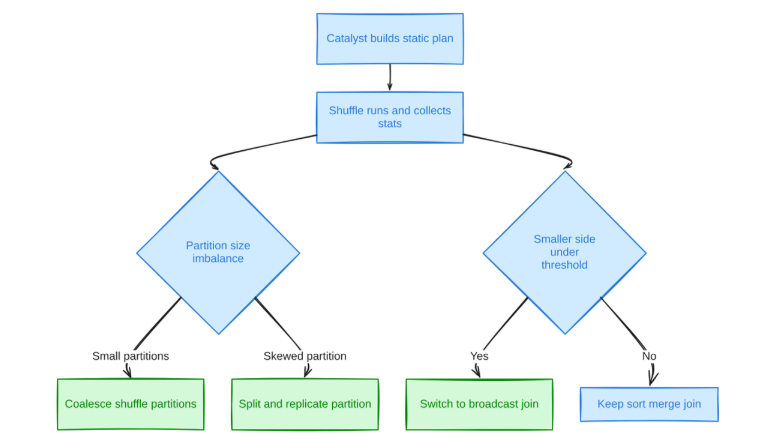
Adaptive Query Execution, AQE, is Spark’s runtime plan-correction layer, and it has been on by default since Spark 3.2.0 via spark.sql.adaptive.enabled, per the SQL performance tuning guide. It watches actual shuffle statistics mid-query and rewrites the rest of the plan around them, closing a real gap: the static plan Catalyst produces before execution is a guess based on table statistics that are frequently stale or missing.
1. Coalescing shuffle partitions
spark.sql.adaptive.coalescePartitions.enabled defaults to true and merges small shuffle partitions toward spark.sql.adaptive.advisoryPartitionSizeInBytes, default 64MB, with a minPartitionSize floor of 1MB. This mechanism has quietly reduced, though not eliminated, the need to hand-tune spark.sql.shuffle.partitions since Spark 3.2.
2. Skew-join handling
spark.sql.adaptive.skewJoin.enabled defaults to true. AQE flags a partition as skewed when its size exceeds skewedPartitionFactor, default 5.0, times the median partition size, and also exceeds skewedPartitionThresholdInBytes, default 256MB. A flagged partition gets split and its matching rows on the other side of the join replicated, so one oversized partition doesn’t stall the whole stage behind it.
3. Join strategy switching
Because AQE sees actual post-shuffle sizes rather than estimates, it can convert a sort-merge join into a broadcast join mid-plan when the smaller side turns out to be under the broadcast threshold, something a static plan built on stale statistics would miss entirely.
AQE is not without sharp edges, though some are historical. SPARK-37442 documented a case, fixed in Spark 3.2.1 and 3.3.0 after affecting 3.1.1 and 3.2.0, where a cached table’s size was under-estimated through InMemoryRelation statistics, leading AQE to attempt a broadcast join on a table that was actually far larger than Spark’s hard-coded 8GB broadcast cap, failing with Cannot broadcast the table that is larger than 8GB. On a current Spark version that bug is patched, but on an older 3.1.x or 3.2.0 deployment, or whenever a cached relation’s self-reported size looks suspect, lowering or disabling spark.sql.autoBroadcastJoinThreshold is still the safer bet than trusting AQE’s estimate.
Partitioning, Shuffle, and Skew
Shuffle partition count and key skew are two different problems that produce the same symptom, a stage that runs far longer than the data volume justifies, and they need different fixes. spark.sql.shuffle.partitions is a static setting that defaults to 200 regardless of data size; practitioner guidance commonly aims for roughly 100 to 200MB of data per partition after a shuffle, a community rule of thumb rather than a number published in Spark’s own docs, and AQE’s coalescing narrows but doesn’t remove the need to get it roughly right up front.
repartition() triggers a full shuffle and produces evenly sized partitions, the right tool when you need to change partition count upward or rebalance keys. coalesce() only merges existing partitions and avoids a shuffle when reducing partition count, making it cheaper whenever you’re narrowing, not widening, partition count, for instance before writing output files.
Skew is the harder problem.
AQE’s skew-join split only fires once a partition crosses both the skewedPartitionFactor and the 256MB skewedPartitionThresholdInBytes floor described above, and it can still be too coarse for extreme cases, or unavailable if AQE is disabled. Manual salting predates AQE’s skew handling and still earns its place for a single hot key absorbing most of the rows in a shuffle:
salt_count = 10
skewed_df = skewed_df.withColumn(
    "salted_col",
    F.concat(F.col("join_col"), F.lit("-"), F.floor(F.rand(123) * salt_count)))

salt_df = spark.range(salt_count)
small_df_salted = (small_df
    .crossJoin(salt_df)
    .withColumn("salted_col", F.concat(F.col("join_col"), F.lit("-"), F.col("id")))
    .drop("id", "join_col"))

result = skewed_df.join(small_df_salted, on="salted_col", how="left")
The pattern spreads a hot key’s rows across salt_count sub-partitions by appending a random integer to the join key on the large side, then cross-joining the small side against a salt table so every salted variant has a matching row. It’s more code than flipping a config flag, but it works even when AQE is off or the skew is too extreme for AQE’s split-and-replicate approach.
A shuffle block over 2GB is a separate failure mode: org.apache.spark.shuffle.FetchFailedException: Too large frame comes from Spark’s TransportFrameDecoder hitting a hard limit on single shuffle block size, almost always because skew concentrated too much data into one partition rather than any network problem. Repartitioning upstream, or salting the key producing the oversized partition, is the fix; retrying the stage just reproduces the same block.
Bucketing is the write-time alternative to repeated shuffles at run time: pre-partitioning a table on a join key so two tables bucketed and sorted the same way can join without a shuffle on either side, at the cost of a bucket count fixed at write time that every writer has to respect.
Data Layout: Formats, Compaction, and Pruning
Data layout decides how much of a dataset a job has to touch before it does any actual computation, which makes it one of the highest-leverage places to cut compute cost on Spark jobs that scan the same tables repeatedly. Columnar formats, Parquet, ORC, and the table formats built on top of them, Delta Lake and Iceberg, let Spark skip whole columns and, with the right statistics, whole files, before reading a single row.
1. Columnar formats and partition pruning
Parquet and ORC store column-level min/max statistics per file, so a filter on a partition column or a clustering column lets Spark skip files outright instead of reading and then discarding rows. Partition pruning only pays off when the partition scheme matches how queries actually filter; a dataset partitioned by a high-cardinality, minute-level timestamp fragments into so many tiny partitions that the overhead of listing and opening each one erases the benefit.
2. Small-file compaction
A landing zone fed by frequent small writes, streaming micro-batches especially, accumulates thousands of small files, and every one costs a file-open and a round trip to object storage before a single byte of data is read. Delta Lake’s OPTIMIZE command, available since Delta Lake 1.2.0 with ZORDER BY added in 2.0.0, bin-packs small files into larger ones and is idempotent, per the project’s OSS optimizations docs, meaning a rerun with no new data is a no-op:
OPTIMIZE events
WHERE date = '2021-11-18'
ZORDER BY (eventType)
3. Z-ordering and clustering
Z-ordering, the second clause in that same command, co-locates related rows within files so file-level min/max statistics actually narrow a scan instead of covering the whole range. Unlike compaction, Z-ordering is not idempotent: each run re-clusters the data, so it’s worth scheduling deliberately rather than running on every write.
4. Statistics
Both AQE and the static Catalyst optimizer lean on table and column statistics to size joins and choose strategies. Stale statistics are a quiet source of the exact join-strategy mistakes AQE exists to correct, which is one more reason a cached relation’s self-reported size, the root cause behind SPARK-37442 above, is worth treating with suspicion.
Memory and Executor Sizing
Executor sizing balances core count against memory per core and the JVM garbage-collection cost that scales with heap size, and getting it wrong shows up as either idle cores or GC-bound tasks. A widely cited worked example from Cloudera’s Spark tuning guide sizes a 16-core, 64GB YARN NodeManager node at three executors per node, with --num-executors 17 --executor-cores 5 --executor-memory 19G as the executor shape. The command below keeps that shape, makes the current default overhead factor explicit and adds GC logging in the JDK 9+ unified-logging syntax, since the old -XX:+PrintGCDetails style flags stop a JDK 17 executor from starting:
spark-submit \
  --num-executors 17 \
  --executor-cores 5 \
  --executor-memory 19G \
  --conf spark.executor.memoryOverheadFactor=0.10 \
  --conf spark.executor.extraJavaOptions="-Xlog:gc*:stdout:time,uptime" \
  myjob.jar
The reasoning behind five cores per executor is concrete: the HDFS client struggles with large numbers of concurrent threads, and roughly five concurrent tasks per executor is near where HDFS write throughput saturates.
The memory math behind that example matters more than the specific numbers. Of 63GB usable per node split three ways, roughly 21GB per executor, Spark reserves overhead before the rest becomes usable execution and storage memory. The Cloudera post’s own arithmetic nets its ~19GB figure using the then-current 7% overhead convention; current Spark instead defaults spark.executor.memoryOverheadFactor to 0.10 (0.40 for non-JVM Kubernetes workloads), and memoryOverhead is the larger of that factor times executor memory or a configured minimum. That overhead is the budget behind the familiar Container killed by YARN for exceeding memory limits failure: a Python process, off-heap buffer, or native allocation outside the JVM heap exceeding what was reserved for it.
Inside the heap itself, Spark’s unified memory manager governs execution and storage with spark.memory.fraction, defaulting to 0.6 of heap minus 300MiB, and spark.memory.storageFraction, defaulting to 0.5 of that region as eviction-immune. Execution can evict storage memory under pressure, but storage can never evict execution, which is exactly why caching data you don’t reuse is never free: it competes with the memory a shuffle or an aggregation needs.
GC cost rises with heap size because a larger heap means a longer mark-and-sweep pass. Spark 4.0.0 runs on Java 17 or 21, where G1GC has been the default collector since JDK 9, so an estate still mixing Spark 3.x on Java 8 runs two different collectors under the same tuning advice. Diagnosing a GC-bound executor means adding -Xlog:gc* through spark.executor.extraJavaOptions and reading the output from the executor stdout logs, not the driver’s.
Spark Cluster Management: Allocation, Autoscaling, and Reliability
Spark cluster management is the layer of decisions, independent of any single job’s code, that determines whether compute sits idle between jobs or gets handed back the moment it isn’t needed. Each choice below trades a bit of latency or operational complexity for a lower bill, and the right trade depends on whether the workload is a scheduled batch job or an always-on streaming pipeline.
1. Static vs dynamic allocation
Dynamic allocation is off by default (spark.dynamicAllocation.enabled=false), with minExecutors at 0, maxExecutors effectively infinite, executorIdleTimeout at 60 seconds and schedulerBacklogTimeout at 1 second once enabled. Turning it on needs a way to keep shuffle files available after an executor is released: the external shuffle service (spark.shuffle.service.enabled=true) on YARN, or spark.dynamicAllocation.shuffleTracking.enabled=true (Spark 3.0+) where no shuffle service runs, as on Kubernetes. With that in place, a job can scale executor count to its actual workload within a run instead of holding a fixed fleet sized for a job whose stages vary wildly in parallelism.
2. Job clusters vs shared long-running clusters
A dedicated, ephemeral cluster per scheduled job avoids one job’s noisy-neighbor problem entirely and terminates the moment the job finishes. A shared, long-running cluster amortizes startup latency across many short jobs but needs the scheduling controls covered below to keep one job from starving another.
3. Spot and preemptible instances
AWS’s own guidance on running Spark on EC2 Spot is specific about where interruption risk is acceptable: a Spot interruption on the Master node terminates the entire cluster, so that node should stay on-demand, and on EMR the Core nodes holding persistent HDFS data should stay on-demand too, while Task nodes, which hold no HDFS data, are where Spot capacity absorbs the bulk of executor cost with minimal impact from any single interruption. Diversifying instance types in the Task fleet reduces the odds that an entire capacity pool disappears at once.
4. Instance family and local storage
A shuffle-heavy job benefits from local NVMe for spill and shuffle files, since that traffic never leaves the instance; a memory-bound aggregation benefits more from a memory-optimized family than from extra vCPUs it can’t use. Matching instance family to the workload class discussed earlier, rather than standardizing on one shape, is a direct way to run Spark jobs without paying for capacity a given job can’t use.
5. Kubernetes vs YARN vs managed services
YARN remains the long-standing default for on-premises and EMR-style deployments and carries the deepest body of tuning literature. Kubernetes trades some of that maturity for tighter resource isolation per job and the non-JVM memory overhead factor (0.40 instead of 0.10) that reflects Python and native-library processes living outside the JVM heap. Managed services abstract most of this layer away in exchange for less direct control over instance selection and scheduling.
6. Scheduler pools for concurrent jobs
Spark’s FAIR scheduler lets multiple jobs share one SparkContext through named pools, each with its own weight and minimum share, instead of the default FIFO behavior that lets one long job starve every job queued behind it. Pools matter most on shared long-running clusters, where a dozen smaller jobs and one large batch job otherwise compete for the same executors with no priority signal at all.
7. Checkpointing and idempotent writes
Structured Streaming requires .option("checkpointLocation", path), and the docs are explicit that this should point at a directory in an HDFS-compatible, fault-tolerant file system, not local disk, because losing the checkpoint forces a restarted query to reprocess from the start rather than resume. foreachBatch only provides at-least-once write guarantees by default; writing exactly once to a non-idempotent sink means using the batchId argument inside foreachBatch { (batchDF, batchId) => ... } to deduplicate batches that already landed. A reliability gap here translates directly into reprocessed compute: slower Spark job execution the next time the pipeline restarts from scratch.
8. Speculative execution trade-offs
spark.speculation defaults to false. Enabling it re-runs a straggler task on a different executor once it falls far enough behind its peers, which can mask a slow node but spends extra compute on every duplicate copy until one attempt finishes, so it fits heterogeneous hardware better than skew, which speculative execution does nothing to actually fix.
Troubleshooting Apache Spark Workloads: From Symptom to Fix
Troubleshooting is faster when the literal string in the UI or the driver log maps directly to a cause, rather than starting from a guess about what changed.
| Symptom / error string | Likely cause | First fix |
|---|---|---|
| Wide task-duration spread on one stage (max >> median) | Key or partition skew |
Confirm spark.sql.adaptive.skewJoin.enabled=true;
if still skewed, salt the join key manually
|
| Cannot broadcast the table that is larger than 8GB | AQE mis-estimated a cached table’s size via InMemoryRelation stats |
Lower or disable spark.sql.autoBroadcastJoinThreshold
(set to -1) for queries touching that cached relation
|
| Could not execute broadcast in 300 secs |
Broadcast side larger or slower to materialize than
spark.sql.broadcastTimeout (default 300s) allows
|
Raise spark.sql.broadcastTimeout, or disable the
broadcast and let it shuffle
|
| org.apache.spark.shuffle.FetchFailedException: Too large frame | A single shuffle block exceeds 2GB, almost always from skew | Repartition upstream or salt the key feeding the oversized partition |
| FetchFailedException citing an unreachable executor address | Executor lost to preemption, spot interruption, or crash mid-shuffle | Check the Executors tab for the matching remove event; move that executor class off Spot or add on-demand fallback |
| Container killed by YARN for exceeding memory limits |
spark.executor.memoryOverheadFactor (default 0.10)
too small for off-heap/Python usage
|
Raise spark.executor.memoryOverheadFactor, or lower
spark.executor.memory to leave headroom in the same container
|
| Total size of serialized results of N tasks... is bigger than spark.driver.maxResultSize |
A collect() or similarly large action pulled too much
data to the driver
|
Write results to storage instead of collecting; avoid raising the 1g default as the primary fix |
| Nonzero shuffle spill (disk) on a stage | Each task’s share of execution memory is smaller than its slice of the shuffle |
Raise spark.sql.shuffle.partitions so each task handles
less data, unpersist cached data competing for the same region,
or add executor memory
|
| High GC Time share in the task table | Too little heap per concurrent task, or cached data crowding the heap |
Lower executor-cores so each task gets more heap, unpersist unused
caches, or raise spark.executor.memory
|
A checklist for tuning a job already in production follows the same order: measure the whole job first, fix the single biggest stage, then re-measure before touching anything else.
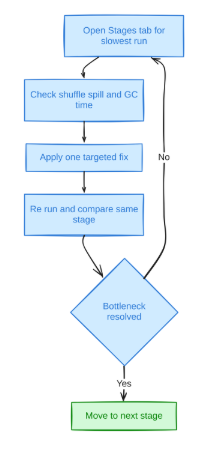
- Open the Stages tab for the slowest run and sort by stage duration, not task count, to find the one stage actually driving wall-clock time.
- Check that stage’s shuffle read/write size, spill, and GC time against the signals described earlier, rather than assuming the cause.
- Apply one fix, a config change, a repartition, a broadcast hint, matched to what the metrics showed, not a bundle of changes at once.
- Re-run and compare the same stage’s metrics, not just total job time, since a fix can shrink one stage while another becomes the new bottleneck.
- Repeat until the remaining stages are either genuinely compute-bound or small enough that further tuning isn’t worth the engineering time.
How Yeedu Runs Apache Spark Workloads More Efficiently
Yeedu runs existing Apache Spark jobs faster on every job type, with zero code changes, inside your own cloud account on AWS, Azure, GCP or OCI, or on your own servers. The tuning in this guide still applies; Yeedu changes the engine underneath it.
Four mechanisms speed up the whole mix. Turbo runs multi-threaded and keeps every available core working in parallel. Smart Scheduling finds idle CPU windows during read and write waits and packs tasks into them, which Yeedu reports as 2-4x higher cluster efficiency for ingestion, ELT and streaming. spark-submit multiplexing runs many jobs inside one shared, long-lived Spark session, so data one job caches serves the next job from memory with no re-read from object storage. The Turbo Parquet disk cache serves repeat reads of the same files from local disk.
CPU-bound work gets the largest gain. Turbo’s C++ vectorized, SIMD-accelerated engine delivers 4-10x faster execution and 60-80% lower compute cost on joins, aggregations, multi-stage transforms and ML feature prep, the 30-40% of a typical workload mix that is CPU-bound. On the synthetic TPC-DS decision-support benchmark, Yeedu completed all 99 of 99 queries for a compute cost of $0.52 at 1TB and $2.33 at 3TB; the benchmark page lists the infrastructure behind those runs.
Yeedu mode removes the shuffle problem for jobs that fit on one machine. It runs the whole job on a single VM instead of a driver plus a fleet of workers, so there are no shuffle blocks written for remote reducers, no cross-zone transfer and no lost-executor fetch failures. Jobs that need a cluster keep one.
Cluster management comes built in: auto start and stop, intelligent autoscaling, several Spark versions side by side and real-time cost visibility per job. When a run fails or slows down, Yeedu Assistant (Assistant X) pulls that run’s Spark logs, Spark History Server event data and cluster monitoring details, then performs the root-cause analysis and recommends a fix.
Adoption happens job by job. Point the slowest or most expensive jobs at Yeedu while catalogs, notebooks, orchestration and every other job stay where they are; Yeedu reads Unity Catalog, Hive Metastore and AWS Glue directly, with no metadata migration. Licensing is a fixed annual price with unlimited usage and no per-core, per-hour or per-job charge.
Conclusion
Efficiency on Spark is rarely one big fix. It’s the accumulation of a dozen small, measurable ones: a shuffle-partition count sized to the data instead of left at 200, a broadcast threshold that matches the dimension tables actually in play, a file layout that doesn’t force a scan of files a filter would have skipped, an executor shape that doesn’t trade cores for GC pauses. Every one of them is visible in the Spark UI before you touch a config file, and every one is reversible if it doesn’t help.
- Measure with the Stages tab, shuffle metrics and GC time before changing anything.
- Prefer DataFrame/SQL and pandas UDFs over RDDs and row-at-a-time Python UDFs.
- Let AQE coalesce partitions and split skew, but don’t trust its size estimate on cached relations.
- Size spark.sql.shuffle.partitions and broadcast thresholds to the data, not to a default.
- Fix small files and bad partition schemes at the storage layer, not in every query that reads them.
- Match executor cores, memory and overhead to the workload, and watch GC time as the signal they’re mismatched.
- Treat dynamic allocation, spot instances and scheduler pools as ongoing cluster-management levers, not one-time setup.
FAQs
How can I make Spark jobs run faster without rewriting them?
Start with configuration rather than code: raise spark.sql.autoBroadcastJoinThreshold for small dimension tables, confirm AQE’s skew-join and partition-coalescing settings are enabled, and compact small files at the storage layer. Each change alters behavior without touching a transformation, and each is visible in the Spark UI immediately after the next run.
How many executors should a Spark job use?
There’s no fixed number. A commonly cited starting point sizes executors around five cores each, because that’s roughly where concurrent-thread contention against HDFS saturates, then divides remaining node memory across however many five-core executors fit after accounting for the executor memory overhead factor. The right count still depends on the stage with the largest shuffle, not an average across the job.
What causes a Spark job to run slower than expected?
The usual suspects are skew concentrating work onto a few tasks, a shuffle that spills to disk because execution memory ran short, small files forcing excess file-open overhead, or an executor shape that spends too much time in garbage collection relative to useful work. The Spark UI’s task-duration spread, spill metrics and GC Time column identify which one applies before you guess.
When should dynamic allocation be turned on?
Turn it on when a job’s stages need very different numbers of tasks, or when several applications share one cluster. Spark requests executors when tasks sit pending past schedulerBacklogTimeout and releases any executor idle past executorIdleTimeout (60 seconds). A short job with uniform stages gains little, because its executor count barely changes from start to finish.
What’s the difference between repartition and coalesce?
repartition() triggers a full shuffle and can both increase and decrease partition count while rebalancing data evenly; coalesce() only decreases partition count and avoids a shuffle by merging adjacent partitions, making it the cheaper option whenever the goal is fewer, larger output files rather than rebalanced keys.
Why does a Spark job fail with a broadcast-related error under AQE?
AQE can mis-estimate a cached table’s size through InMemoryRelation statistics and attempt to broadcast a table that’s actually larger than Spark’s 8GB broadcast cap, failing with Cannot broadcast the table that is larger than 8GB, or it can broadcast a side that takes longer than spark.sql.broadcastTimeout’s 300-second default to materialize. Lowering or disabling the broadcast threshold for the query involved avoids both failure modes.
Does caching a DataFrame always make a Spark job faster?
No. .cache() helps only when the same DataFrame feeds two or more actions, because the first action pays to compute and store it. A DataFrame read once gains nothing, and its cached blocks take storage memory that a shuffle or aggregation could have used, which can turn into spill. Call .unpersist() as soon as the reuse ends.