

Databricks pricing is expensive for most teams because two separate bills run at the same time: Databricks charges for Databricks Units (DBUs) consumed by whichever compute type a job runs on, and the cloud provider charges separately for the VMs, storage and network those DBUs sit on top of. Usage patterns multiply both meters at once, which is why a bill can double without anyone changing a single line of code.
Databricks pricing differs by cloud, by region, and by which tier or edition a workspace is on, so two companies running what looks like the same workload can land on different numbers. Compute type changes the DBU rate too: a Jobs cluster, an All-Purpose cluster, a SQL warehouse and a serverless notebook all consume DBUs at different rates for the same underlying VM. None of that is hidden, exactly, but it is spread across a pricing page, a calculator, and a set of docs that assume the reader already knows which compute type they’re being billed under.
This breakdown walks through where that money actually goes: what a DBU is, how the compute-type and serverless choices change the rate, what typically inflates a bill, and how to see the damage before the invoice arrives.
The Two-Meter Problem: Why Databricks Bills Feel Unpredictable
Every classic, non-serverless Databricks workload is billed twice, by two different parties, for two different things. Databricks itself frames it this way: on classic, non-serverless compute, the cloud provider bills VM, storage and network resources separately from the DBU charge, two meters, two invoices (Databricks pricing). One invoice comes from Databricks for compute-time, measured in DBUs. The other comes from AWS, Azure or GCP for the instances, managed disks, and network transfer those DBUs were metered against.
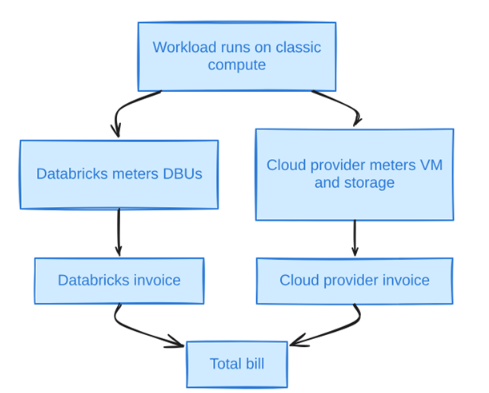
Diagram 1
Neither meter alone explains a bill. A team can look at a flat DBU count and still get surprised by the cloud invoice, because DBU consumption says nothing about instance family, spot pricing, or how much data moved across availability zones. The reverse is also true: a quiet cloud bill can hide a DBU rate that spiked because Photon got turned on for every cluster in a workspace policy.
The table below is the fast version of the two-meter model: what each component bills for, who sends the invoice, and the lever that moves it.
| Cost component | What it bills for | Who bills it | What drives it up |
|---|---|---|---|
| DBUs (compute-time) | Normalized processing capacity, metered per second | Databricks | Compute type (All-Purpose vs Jobs vs SQL), Photon, serverless premium |
| Cloud VM / instance-hours | The actual EC2/VM compute instance | AWS / Azure / GCP | Instance family, on-demand vs spot, cluster size, idle time |
| Storage | Data at rest (Delta/Parquet files, logs) | Cloud provider | Table bloat, small files, retention, lack of OPTIMIZE/VACUUM |
| Network | Cross-AZ and egress traffic | Cloud provider | Shuffle-heavy jobs, multi-region reads, cluster-to-storage topology |
| Serverless premium | Infrastructure bundled into one DBU rate | Databricks | Burst frequency, workload duration (short jobs favor it, long ones don’t) |
Within the two-meter model, serverless compute changes this picture by folding the VM cost into one Databricks invoice, which trades predictability for a higher per-unit rate. That premium is simply the cost of bundling infrastructure into a single bill, and the trade is covered in detail further down.
Databricks Units: The Core of the Databricks Pricing Model
A DBU is Databricks’ own unit of account: “a normalized unit of processing power on the Databricks Lakehouse Platform used for measurement and pricing purposes,” billed at per-second granularity under either pay-as-you-go or a committed-use discount contract.
The definition is intentionally abstract. A DBU is not a CPU-hour or a GB processed. It’s a rate Databricks assigns per instance type, per compute type, per cloud. The same instance type consumes a different number of DBUs per hour depending on whether it’s running inside a Jobs cluster, an All-Purpose cluster, or with Photon enabled, which is the mechanism, not a side effect, of how the Databricks pricing model separates what the job needs from what the licence costs.
Databricks pricing does not include a single flat DBU-to-dollar rate on the main pricing page. Actual per-DBU dollar figures live behind cloud-specific calculators that render client-side and vary by cloud, region, commitment level and tier. Any specific dollar-per-DBU number circulating outside Databricks’ own current calculator should be treated as unverified until checked live, dated to the day it was checked.
Committed-use contracts are the discount layer that lowers the per-DBU rate in exchange for a minimum committed spend over a term. Exact discount tiers vary by cloud, contract length and commitment amount and change often enough that any specific percentage needs a current, dated quote from Databricks sales before you plan around it.
Databricks Compute Types and How Each One Bills
Databricks bills DBUs at a different rate for every compute type, so the same job can cost a different amount depending purely on which compute surface it runs on. That’s the single most load-bearing fact in the Databricks pricing model, and it’s also the one most teams don’t check until the bill is already large.
1. Jobs compute
Jobs compute is the ephemeral, non-interactive cluster type meant for scheduled production pipelines: it spins up for a run and terminates when the run finishes. Databricks’ own cost-optimization documentation states plainly that non-interactive workloads “cost significantly less” on Job compute than on All-Purpose compute for the same work (cost-optimization best practices). The DBU rate for Jobs compute sits below All-Purpose because the cluster carries none of the interactive-session overhead Databricks prices into All-Purpose.
2. All-Purpose compute
All-Purpose compute is the interactive cluster type behind notebooks, ad hoc queries and anything a human attaches to directly. It bills at a materially higher DBU rate than Jobs compute for the identical underlying VM, the rate differential Databricks’ own best-practices guide is describing when it tells customers to route non-interactive work off it.
3. SQL warehouses
In Databricks pricing, SQL warehouses come in Classic, Pro and Serverless tiers, each billed at a different DBU rate, used for BI and ad hoc SQL rather than notebook-driven ETL. A Serverless SQL warehouse bills a premium DBU rate that folds in the underlying compute; Classic and Pro warehouses run on infrastructure visible in, and billed through, the customer’s own cloud account.
4. Delta Live Tables and Lakeflow pipelines
Delta Live Tables, now largely rebranded Lakeflow, bills declarative pipeline execution at its own DBU rate across Core, Pro and Advanced tiers, plus a serverless option, separate from the Jobs and All-Purpose rates used for conventional notebook or script-based ETL.
5. Model Serving
Model Serving is serverless-only, and Databricks’ own Model Serving pricing page, current as of 2026-10-27, publishes the GPU consumption rates directly: a single T4 GPU consumes 10.48 DBU/hour, a single A10G 20.00 DBU/hour (290.80 for an 8-GPU A10G node), a single H100 100.00 DBU/hour, and an 8-GPU H100 node 800.00 DBU/hour (Model Serving pricing). Because Model Serving is always serverless, that DBU rate is the only number that matters. There’s no separate cloud GPU invoice sitting underneath it.
Serverless Databricks Cost vs Classic Compute
Serverless Databricks cost works differently from classic compute because the DBU rate absorbs the infrastructure instead of leaving it as a second invoice. On classic compute, the DBU charge and the cloud VM charge are genuinely separate line items that a FinOps team has to reconcile against each other. On serverless, Databricks bills one number set higher per unit, because it’s standing in for both the compute-time licence and the VM Databricks is running on the customer’s behalf.
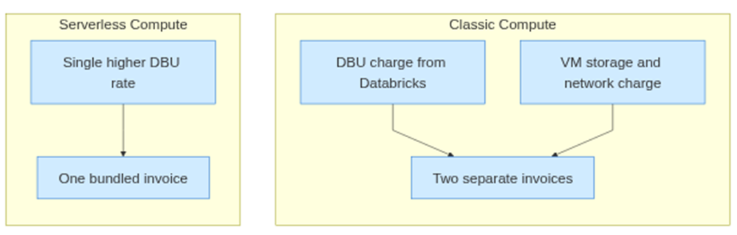
Diagram 2
That bundling is a trade: predictability for a higher per-unit rate. A short, bursty, unpredictable job, the kind that would otherwise sit idle on a warm All-Purpose cluster waiting for the next notebook cell, tends to come out cheaper serverless, because there’s no idle VM accruing cost between invocations and no cold-start cluster to provision. A long-running, steady-state job that would otherwise fully utilize a right-sized classic cluster for hours at a stretch tends to come out more expensive serverless, because the premium baked into the rate gets paid continuously rather than only during the idle gaps it was designed to absorb.
Related Read: Databricks Serverless vs Yeedu Warm Start
Databricks’ own admin documentation, current as of 2026-10-27, backs this up structurally: serverless execution carries a default execution timeout of 2.5 hours (spark.databricks.execution.timeout=9000, in seconds), a cap that matters more on a billing surface where the infrastructure cost sits inside the rate rather than as a separate, stoppable VM (cost management tools). Classic compute, by contrast, is governed by auto-termination settings that must sit between 10 and 10,000 minutes, roughly seven days, for both the UI and the autotermination_minutes field on the Create Cluster API, per the Databricks cluster management documentation. Whoever sets that value is making an explicit idle-cost decision. On serverless, Databricks has already made it for them.
Photon complicates both surfaces equally. It’s a C++ vectorized execution engine, and the Photon documentation states outright, as of 2026-10-27, that “Photon instance types consume DBUs at a different rate than the same instance type running the non-Photon runtime.” The same documentation cites up to 5x price/performance on the TPC-DS benchmark, a ceiling to test against your own jobs rather than a number to budget around. Photon is priced as a multiplier on top of whichever compute type it’s attached to, classic or serverless, which is why enabling it platform-wide without checking the payback is one of the most common ways a bill grows without a corresponding increase in useful work.
A Worked Example: DBU Rate vs Underlying Compute Cost
Whether the DBU line or the cloud VM line dominates a bill depends entirely on compute type and instance choice, not on some fixed ratio, so the clearest way to show it is a worked, clearly labeled illustrative calculation. Nothing in this section is a published Databricks rate; every number is marked illustrative so the arithmetic can be redone with a team’s own figures.
Assume, illustratively, a Jobs-compute cluster of four worker nodes plus one driver, each node consuming 2 DBUs/hour (an illustrative rate, not a published one), running an 8-hour nightly batch, 22 business days a month:
DBU cost   = 5 nodes x 2 DBU/hr x 8 hr/day x 22 days x (illustrative $/DBU rate)
VM cost    = 5 nodes x (illustrative on-demand $/hr) x 8 hr/day x 22 days
Total bill = DBU cost + VM cost
Swap in a Photon-enabled instance and the DBU-per-node rate rises per Databricks’ own multiplier framing above, while the VM cost line stays flat because the underlying hardware hasn’t changed. Swap the same job onto an All-Purpose cluster instead of Jobs compute and only the DBU rate moves, again with the VM line untouched, the exact mechanism Databricks’ cost docs point to when recommending Job compute for non-interactive work. Swap it onto serverless and the two lines merge into one, priced to cover both.
The dollar total isn’t really the point here. What matters is that the DBU line and the VM line answer to different levers: compute type and Photon move the first, instance family and spot usage move the second, and a team that only watches one of them is managing half its Databricks DBU costs blind.
Related Read: Databricks and Yeedu: How They Work Together
What Drives a High Databricks Bill
A handful of usage patterns account for most of the gap between a Databricks bill that matches expectations and one that doesn’t, and all of them multiply either the DBU meter, the cloud meter, or both at once. Each shows up differently in logs, dashboards or the invoice itself, broken down below.
1. All-purpose clusters running scheduled jobs
What it looks like: a production pipeline shows up in system.billing.usage with sku_name reflecting All-Purpose compute and a job_id in usage_metadata, rather than a Jobs-compute SKU. Why it happens: someone attached a scheduled notebook to an existing interactive cluster instead of defining a job cluster, often because it was already running and seemed convenient. How to confirm it: filter the billing usage table for rows where usage_metadata.job_id is set and sku_name contains ALL_PURPOSE. Fix: a dedicated job cluster with autoscale bounds, defined in the job’s settings:
"job_clusters": [{
  "job_cluster_key": "etl",
  "new_cluster": {
    "spark_version": "<runtime-version>",
    "node_type_id": "<instance-type>",
    "autoscale": {"min_workers": 2, "max_workers": 8}
  }
}]
2. Idle clusters and long auto-termination windows
What it looks like: a cluster whose state reports RUNNING in the UI or the Clusters API for hours with no active command, or a billing row with steady usage_quantity across a period with no corresponding job completion. Why it happens: auto-termination is set too high, set near the maximum of 10,000 minutes allowed per the Databricks cluster documentation, or disabled by unchecking the box. How to confirm it: cross-reference cluster event logs (start/idle/terminate timestamps) against job run history for the same cluster_id. Fix: a cluster policy that caps both the idle window and the per-cluster DBU ceiling.
{
  "autotermination_minutes": {"type": "fixed", "value": 60},
  "dbus_per_hour": {"type": "range", "maxValue": 40}
}
Databricks’ best-practices documentation states exactly this: “enable cluster auto termination with a reasonable value (for example, 1 hour) to avoid paying for idle times.”
3. Oversized or mismatched instance types
What it looks like: a driver node provisioned at the same size as the workers on a job whose driver does almost nothing but orchestrate tasks. Why it happens: cluster configs get copied between jobs rather than sized to the workload, and nobody revisits the instance family after the first deploy. How to confirm it: check driver CPU/memory utilization against worker utilization for the same run; a driver sitting near-idle while workers are saturated is the signature. Fix: size the driver independently of the workers and enforce instance families through a cluster policy rather than leaving node-type choice to whoever launches the cluster.
4. Photon enabled without payback
What it looks like: a job’s wall-clock time barely changes after Photon is enabled, but its DBU consumption rises. Why it happens: Photon bills at a different, higher DBU rate, and Databricks itself notes it “provides the greatest benefit for longer-running queries that process large datasets,” with queries finishing in roughly two seconds or less seeing little benefit because planning overhead dominates rather than execution, per the Photon documentation. How to confirm it: compare DBU-hours and wall-clock duration for the same job with Photon on and off. Fix: evaluate regularly run jobs for whether they’re “not only faster but also cheaper” with Photon on, per Databricks’ own cost-optimization guidance, rather than assuming it by default.
5. Inefficient Spark code: shuffles, skew and small files
What it looks like: a stage graph dominated by wide shuffles, a long tail of tasks finishing well after the median (skew), or thousands of tiny output files per partition. Why it happens: default shuffle partition counts don’t match data volume, join keys are unevenly distributed, and writes aren’t consolidated. How to confirm it: the Spark UI’s stage view shows task duration variance and shuffle read/write size directly. Adaptive Query Execution (AQE) has been on by default since Spark 3.2, and setting it explicitly alongside skew-join handling makes the intent visible in the job config:
spark.conf.set("spark.sql.adaptive.enabled", "true")
spark.conf.set("spark.sql.adaptive.skewJoin.enabled", "true")
# Optimized writes consolidate small files on Delta writes
spark.conf.set("spark.databricks.delta.optimizeWrite.enabled", "true")
6. SQL warehouses left running
What it looks like: a Classic or Pro SQL warehouse showing continuous uptime with query activity concentrated in a few hours of the day. Why it happens: the warehouse’s auto-stop window is set generously, or disabled, to avoid cold-start latency for analysts. How to confirm it: check the warehouse’s configured auto-stop interval against its actual query gaps. Fix: tighten auto-stop to match real usage hours and reserve always-on warehouses for workloads that genuinely need them.
7. No tagging or ownership
What it looks like: a billing usage query that returns usage_metadata rows with no clean mapping back to a team, project or cost center. Why it happens: tags were never enforced at cluster-creation time, so attribution has to be reconstructed after the fact, if at all. How to confirm it: sample system.billing.usage rows and check for custom tag coverage. Fix: enforce tags through cluster policies and, on serverless, through budget policies, which Databricks documents as auto-attaching tags to serverless notebook, job, pipeline and serving usage without depending on manual tagging.
8. Dev/test sprawl
What it looks like: dozens of personal or project clusters, many idle most of the day, each a small line item that never individually looks worth investigating. Why it happens: nobody owns the decommission step once a project ends. How to confirm it: count distinct cluster_id values active in a 30-day billing window against the number of active production jobs; a large gap is sprawl. Fix: a policy cap such as max_clusters_by_user: 2, plus a periodic review of clusters with no recent job attachment.
| Symptom or log line | Likely cause | First fix |
|---|---|---|
| Billing row shows All-Purpose SKU against a scheduled job_id | Scheduled notebook attached to an interactive cluster | Move to a dedicated Jobs-compute cluster with autoscale bounds |
| Cluster shows RUNNING for hours with no command history | Auto-termination disabled or near the 10,000-minute ceiling |
Set autotermination_minutes to something like 60 via cluster policy
|
| Driver CPU/memory near-idle while workers are saturated | Driver sized the same as workers by default | Right-size the driver node type independently in the cluster config |
| DBU-hours rise but wall-clock time is roughly flat | Photon enabled on a short or small-data job | Benchmark Photon on vs off before enabling it by default |
| Stage view shows a long task-duration tail and large shuffle writes | Join key skew, shuffle partition count mismatched to data volume |
Enable spark.sql.adaptive.skewJoin.enabled and tune the shuffle partition count
|
| Warehouse uptime continuous but query volume concentrated in a few hours | Auto-stop interval set too high or disabled | Tighten the warehouse auto-stop window to match real usage |
Why Your Bill Grows Even Though Workloads Haven’t Changed
A Databricks bill can rise month over month with no new feature shipped and no new pipeline added, because several of the inputs behind it move on their own. Data volume is the obvious one: the same nightly job scanning a table that grew 30% this quarter does 30% more work at the same DBU rate, so the bill follows the data, not the code.
Table bloat compounds that. Small files accumulate from streaming micro-batches or frequent merges, and every additional file is extra open/read overhead that shows up as more DBU-seconds for the same logical query, not more useful output. Left unmanaged, a table that hasn’t grown much logically can still get materially more expensive to query. This is the point where Databricks DBU efficiency stops being a tuning exercise and starts being table maintenance.
Runtime upgrades matter too. A new Databricks Runtime version can change default Spark configurations, including which optimizations apply automatically, so an upgrade can shift a job’s resource footprint even if its code is untouched. The same is true of SKU or rate changes at contract renewal, which Databricks is free to adjust between commitment periods and which a team only notices when the next invoice doesn’t match the last, another reason Databricks DBU pricing deserves a periodic recheck rather than a one-time lookup.
Headcount and habit growth add a quieter drag: new users mean new notebooks, new ad hoc clusters, and new All-Purpose sessions that weren’t in last quarter’s baseline. Serverless adoption shifts cost in a specific direction too, trading two predictable line items for one less predictable one, the trade-off described above. And a job that silently retries after failing, rather than alerting someone to fix the root cause, bills for every attempt, not just the one that succeeded, one more way Databricks costs drift upward without a matching increase in output.
Cost Visibility, Governance and the Databricks Price Calculator
Seeing where money actually goes in Databricks takes a combination of system tables, tags, budgets and the public price calculator, and each one covers a different blind spot. None of them, alone, is the full picture.
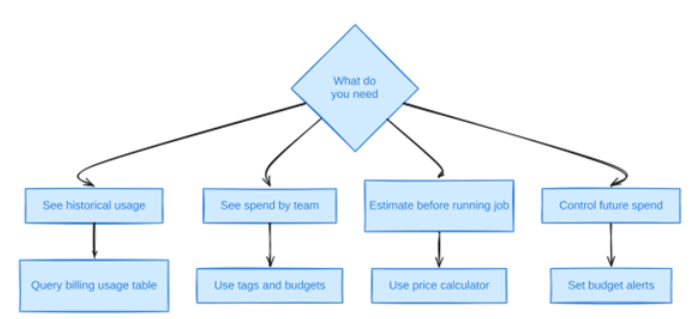
Diagram 3
On the Unity Catalog system tables, current as of 2026-10-27, system.billing.usage is the foundation: it carries usage_unit, usage_type, sku_name, cloud and billing_origin_product, plus a nested usage_metadata struct with cluster_id, job_id and warehouse_id, the join key for attributing DBU spend to a specific job or cluster. It does not contain cloud VM, storage or network cost; that lives in the cloud provider’s own billing export, not in any Databricks system table. A naive SUM(usage_quantity) over this table can also overcount, because record_type distinguishes original rows from RETRACTION and RESTATEMENT corrections. Databricks’ own documentation demonstrates filtering those out with a HAVING usage_quantity != 0 clause; extended here with job and cluster attribution, a query in that pattern looks like this:
SELECT usage_metadata.job_id,
       usage_metadata.cluster_id,
       sku_name,
       usage_start_time, usage_end_time,
       SUM(usage_quantity) AS dbus
FROM system.billing.usage
WHERE billing_origin_product = 'JOBS'
GROUP BY ALL
HAVING dbus != 0
Tags sit on top of that table as the attribution layer: without them, a billing row is technically attributable to a cluster or job ID but not to a team or cost center unless someone maintains that mapping separately. Budgets and budget alerts are the forward-looking control, and on serverless specifically, budget policies auto-attach tags to notebook, job, pipeline, serving and app usage so attribution doesn’t depend on a human remembering to tag anything.
The Databricks price calculator, reachable from the main pricing page, estimates DBU cost for a given compute type, instance size and cloud before a workload runs. It’s useful for sizing a new pipeline, but it renders client-side per cloud and region and doesn’t reflect committed-use discounts or a workspace’s actual historical usage, so treat it as a planning tool rather than a reconciliation tool; the billing system tables are what to check after the fact.
None of this closes the loop without an owner. Databricks’ own FinOps guidance describes a four-stage maturity model: cost attribution (tagging), cost reporting (dashboards and alerts), cost controls (policies and limits), and cost optimization (right-sizing), explicitly positioning spend control as an organizational function with a “Center of Excellence” platform team allocating and reporting cost to business units, not a one-time settings change. A dashboard nobody is accountable for reading doesn’t reduce the cost of Databricks any more than a cluster policy nobody enforces does.
Databricks Cost Optimization Levers
The levers that move a Databricks bill the most are the ones that change which meter is running, not the ones that shave a few percent off an already-correct configuration. In rough order of leverage: move scheduled, non-interactive work off All-Purpose clusters and onto Jobs compute, since Databricks’ own docs state this is significantly cheaper for the same work; set auto-termination to a value matched to real idle gaps rather than the platform default; enforce instance families and driver sizing through cluster policies rather than per-user discretion; use spot instances for fault-tolerant worker nodes while keeping the driver on-demand, per Databricks’ own spot guidance; evaluate Photon per job instead of enabling it workspace-wide; fix shuffle, skew and small-file patterns in the Spark code itself; and consider a committed-use contract once usage is stable enough to forecast, since the discount only pays off against a baseline that doesn’t swing month to month.
Databricks cost optimization, approached this way, is a sequence of structural changes to how compute is scheduled and sized, not a single switch. None of it requires touching the two-meter model itself. It just stops feeding both meters more than the workload needs.
Yeedu: A Cost-Efficient Spark Platform for High-DBU Workloads
Yeedu removes the per-DBU meter instead of optimizing around it. It is licensed at a fixed annual price for unlimited usage, with no charge per core, per hour, per job or per DBU, so the software line on the bill stops growing with usage. A fixed licence and a consumption meter are different models, and what the licence is worth against your DBU spend depends on your own usage curve.
Yeedu runs inside your own AWS, Azure, GCP or Oracle Cloud account, or on-premises, across ARM, x86 and GPU runtimes. BYOCatalog reads Unity Catalog, Hive Metastore and AWS Glue directly, with zero metadata migration, so governance stays exactly where it is.
Jobs run faster across every job type, per Yeedu’s product figures, which means fewer compute-hours for the same work. The engine multi-threads across all available cores. Smart Scheduling packs tasks into idle CPU windows during reads and writes, for 2-4x higher cluster efficiency on ingestion, ELT and streaming. spark-submit multiplexing lets jobs share one long-lived session and its cache, and the Turbo Parquet disk cache serves repeat reads locally. On CPU-bound work, the 30-40% of workloads dominated by joins, aggregations and multi-stage transforms, the vectorized C++ Turbo engine runs 4-10x faster at 60-80% lower compute cost, with zero code changes.
On the synthetic TPC-DS decision-support benchmark, Yeedu completed all 99 queries at a compute cost of $0.52 for 1 TB and $2.33 for 3 TB, on what the benchmark page presents as a production-grade configuration. The page lists the infrastructure details so you can check them.
Auto start/stop and autoscaling go after the same idle cost described earlier, and real-time per-job cost visibility is built in rather than reconstructed from a billing export. Adoption is job by job: point your highest-DBU jobs at Yeedu while the catalog, notebooks, dashboards, orchestration and every other job stay on Databricks.
Conclusion
Databricks costs run high not because any single number on the pricing page is unreasonable, but because two meters run simultaneously and several common usage patterns, idle clusters, All-Purpose compute used for scheduled jobs, Photon without payback, inefficient Spark code, multiply both at once. Fixing it is mostly a matter of routing work to the right compute type, sizing and terminating clusters deliberately, and giving someone ownership of the billing data that already exists in the system tables.
The key points:
- Two separate invoices exist for classic compute: DBUs from Databricks, VMs/storage/network from the cloud provider.
- A DBU’s dollar value depends on compute type, cloud, region and tier; it is not a fixed, universal rate.
- Serverless bundles infrastructure into a higher DBU rate, favoring short, bursty work over steady, long-running jobs.
- Idle clusters, oversized drivers, All-Purpose scheduling and unreviewed Photon usage are the most common, most fixable drivers of a high bill.
- system.billing.usage, tags and budget policies are the tools for seeing spend; none of them substitutes for an accountable owner.
- Optimization levers, Jobs compute, auto-termination, cluster policies, spot, code fixes, commitments, change which meter runs, not the pricing model itself.
FAQs
What are the main drivers behind a high Databricks bill?
The biggest drivers are All-Purpose clusters running scheduled jobs instead of cheaper Jobs compute, idle clusters left running past their useful work, oversized or mismatched instance types, Photon enabled without checking the payback, inefficient Spark code that burns extra shuffle and I/O, and dev/test sprawl that nobody decommissions.
Is it the DBU rate or the underlying compute that costs more?
Neither one wins by default; it depends on compute type and instance choice. On classic compute, DBU rate and cloud VM cost are two independent lines that move with different levers: compute type and Photon shift the DBU line, instance family and spot usage shift the VM line, so either can dominate depending on configuration.
Do idle clusters contribute meaningfully to Databricks spend?
Yes. An idle cluster still accrues both DBU charges and cloud VM charges until it terminates, and per the Databricks cluster documentation, auto-termination allows an inactivity window as long as 10,000 minutes, roughly seven days, if left unconfigured or set carelessly, during which an idle cluster bills continuously for no completed work, a state that shows up in the UI or Clusters API simply as RUNNING.
What is a DBU in Databricks?
A DBU, or Databricks Unit, is Databricks’ own normalized unit of processing power, billed at per-second granularity, used to measure and price compute consumption across the platform. Its dollar value varies by compute type, instance type and cloud, so the same workload can consume a different number of DBUs depending on where it runs.
Does Databricks pricing include cloud infrastructure?
It depends on the compute type. Classic compute bills DBUs separately from the cloud provider’s VM, storage and network charges: two invoices for one job. Serverless compute bundles the infrastructure into a single, higher DBU rate, so only one invoice shows up, priced to cover both.
Why is my Databricks bill increasing even though our workloads haven’t changed?
Several inputs move independently of the code: data volume growth, table bloat from small files, runtime version upgrades that change default Spark behavior, SKU or rate changes at contract renewal, new users creating new interactive sessions, and failed jobs that retry and bill for every attempt rather than just the successful one.
How can I reduce my Databricks costs without slowing down performance?
Route non-interactive, scheduled workloads to Jobs compute instead of All-Purpose, set autotermination_minutes to match real idle gaps, fix shuffle skew in the code with Adaptive Query Execution, enforce instance sizing through cluster policies, use spot instances for fault-tolerant worker nodes while keeping the driver on-demand, and evaluate Photon per job rather than enabling it everywhere. These changes move the job to a cheaper compute surface and rate; none of them degrades the job itself.