✦ Register Now ✦ Take the 30 Day Cost-Savings Challenge

Running Thrift Jobs Seamlessly in Yeedu

Konda Samaikya
January 29, 2026
yeedu-linkedin-logo
yeedu-youtube-logo
Running Thrift Jobs Seamlessly in Yeedu

Apache Spark Thrift Server in Yeedu enables users to run SQL workloads using standard JDBC/ODBC tools while leveraging Spark’s distributed processing capabilities. This document provides a complete, step-by-step guide to setting up and using Yeedu Thrift, covering prerequisites, cluster configuration, and linking external clients through a Spark JDBC connection.

Overview of Yeedu Thrift

Yeedu Thrift is a managed Spark Thrift Server provided by the Yeedu platform. It allows users to interact with Spark using SQL without submitting Spark jobs manually, bringing the power of Apache Spark SQL Thrift to familiar analytics workflows.

Using Yeedu Thrift, users can:

  • Execute queries via JDBC/ODBC using Apache Spark SQL Thrift
  • Connect BI and SQL tools such as DBeaver or Beeline through a secure Spark JDBC connection
  • Share a single Spark context across multiple concurrent SQL sessions using managed Spark Thrift Server
  • Run interactive and production SQL workloads efficiently

This approach removes the operational overhead typically associated with running and managing individual Spark jobs or legacy Hive Thrift Servers.

Prerequisites

Before running Thrift jobs in Yeedu, ensure the following requirements are met to support correct Spark Thrift server configuration:

  • The cluster must operate exclusively in YEEDU mode
  • Supported Spark versions:
    1. Spark 3.5.1
    2. Spark 3.4.3
  • The cluster must be associated with a workspace
  • The user must have one of the following workspace permissions:
    1. CAN RUN
    2. CAN EDIT
    3. CAN MANAGE

Thirft Setup Flow

To run Thrift jobs successfully, complete the following steps:

  1. Create a standalone Hive Metastore
  2. Create a Thrift-enabled cluster
  3. Add required packages and Spark thrift server configurations
  4. Retrieve JDBC connection details from the Yeedu UI
  5. Connect using a JDBC-compatible client
  6. Performing queries in Dbeaver submits a thrift job in Yeedu

Step 1: Create a Standalone Hive Metastore

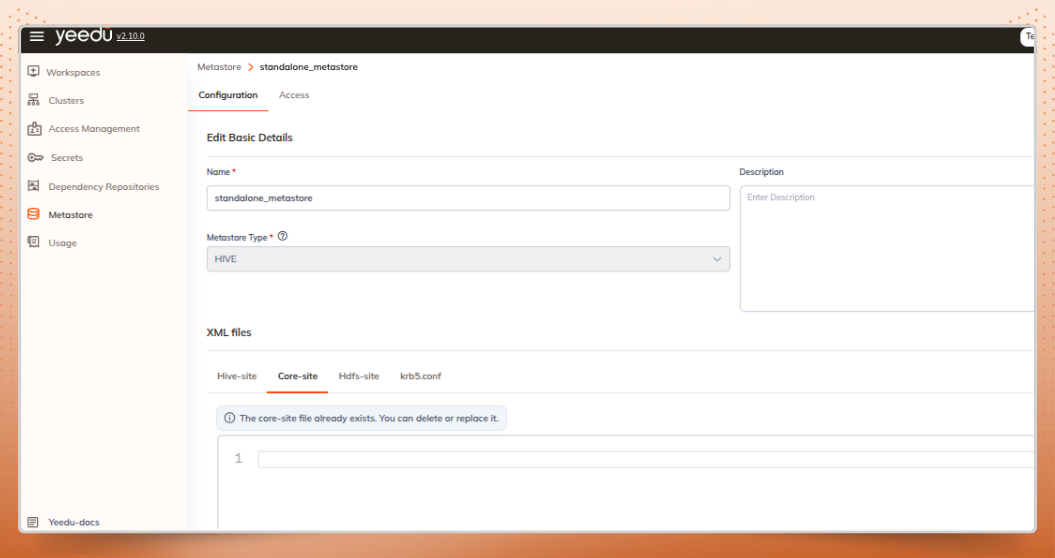
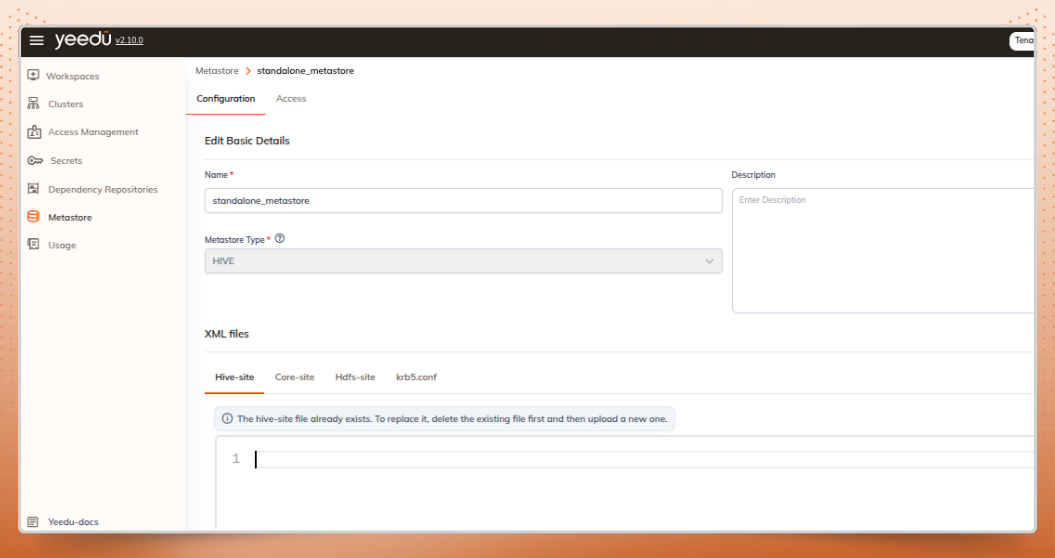
Yeedu Thrift relies on a Hive Metastore to store and manage table and schema metadata used by Apache Spark SQL workloads.

  • Create a Hive Metastore with the name:

standalone_metastore

  • Configure the metastore using existing:
    • hive-site.xml
    • core-site.xml
  • Ensure the metastore database (for example, PostgreSQL) is reachable from the cluster

This standalone metastore will be used by the Spark Thrift Server to manage metadata centrally.
Hive-site.xml
Hive-site.xml
Core-site.xml
Core-site.xml

Step 2: Create a Thrift-Enabled Cluster

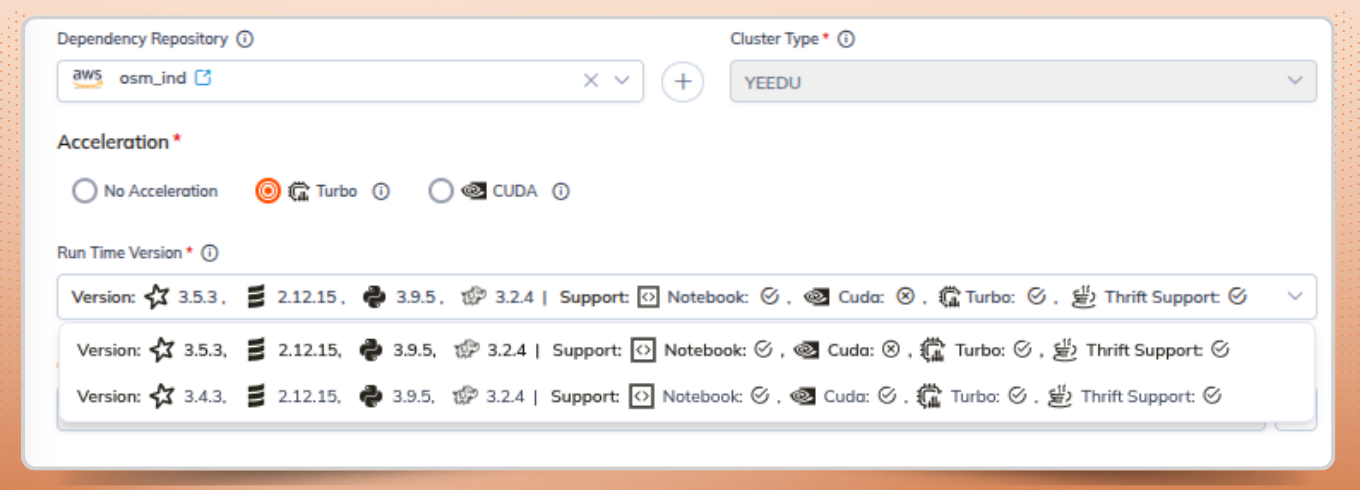
From the Yeedu UI, create a new cluster with the following settings:

  • Cluster mode set to YEEDU
  • Spark version set to 3.5.1 or 3.4.3
  • Cluster mapped to the required workspace
  • Attach the created metastore to the cluster.

Once created, the cluster will be capable of running workloads on Spark Thrift Server.
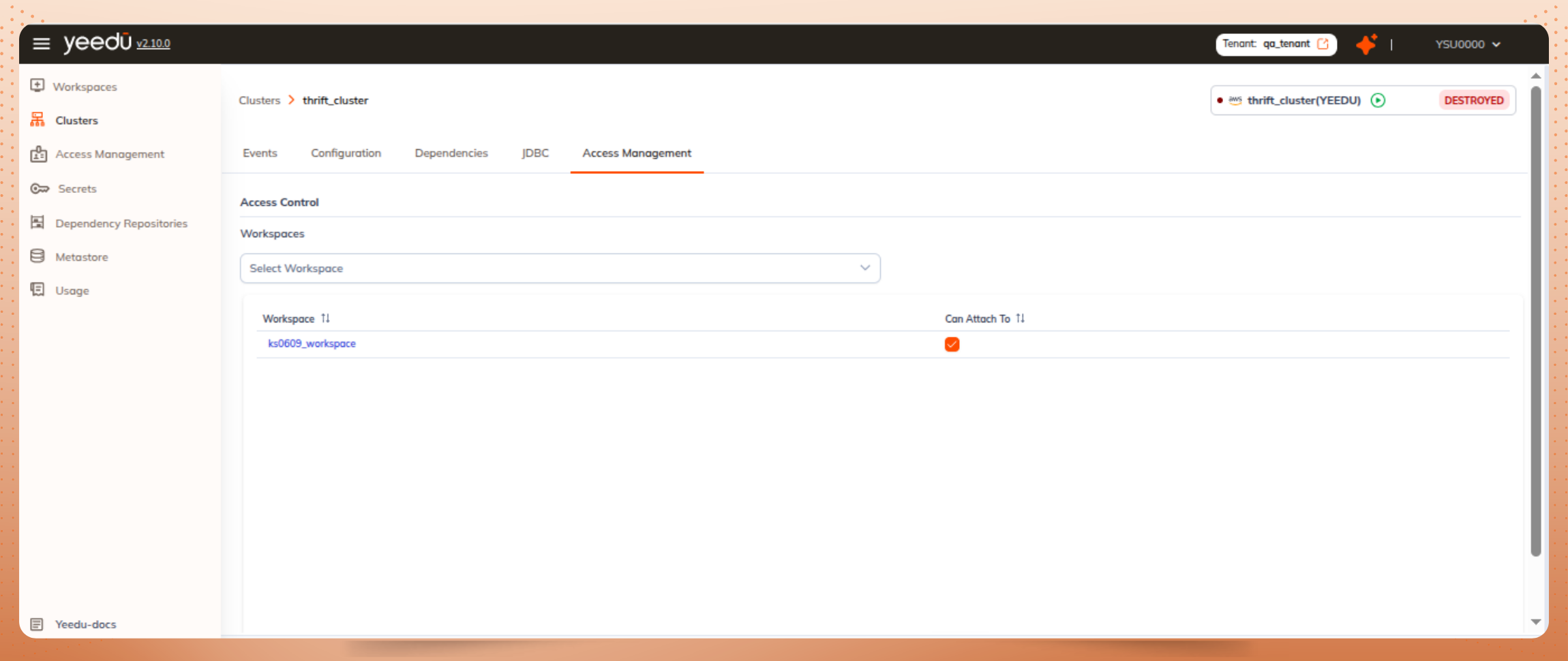
Association of cluster
Cluster type and Spark Versions

Step 3: Add Required Packages and Configurations

Add Maven Package

Add the Maven dependency to the cluster configuration:

Example : org.apache.hadoop:hadoop-aws:3.2.4

This package is required for accessing S3-compatible object storagew hen queries are executed through Apache Spark SQL Thrift.
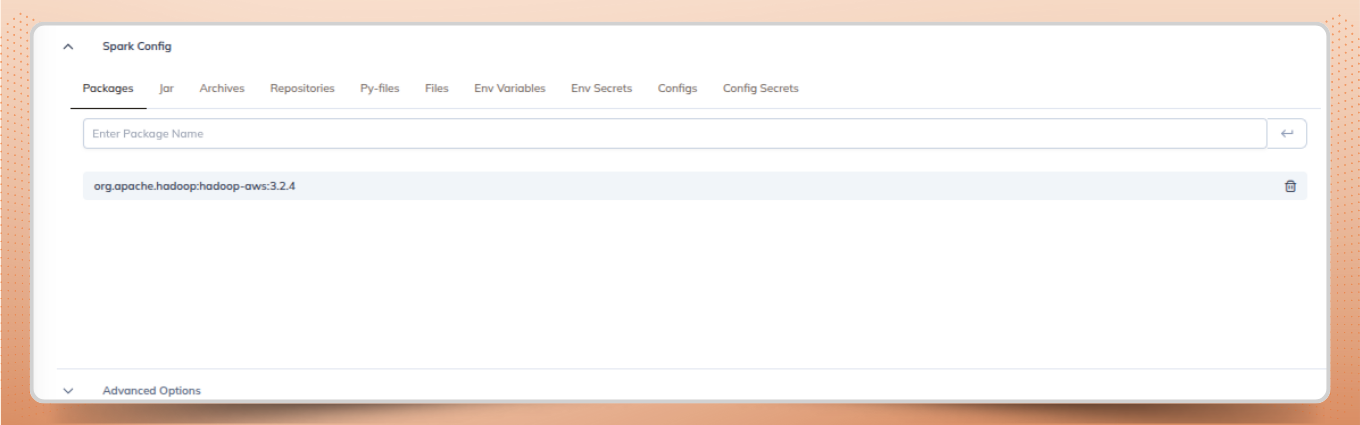
Packages
Packages

Add Spark Configuration

Add the Spark configuration to the cluster to complete the Spark Thrift Server configuration.

This ensures that the PostgreSQL JDBC driver is available to the Spark driver for Hive Metastore connectivity.
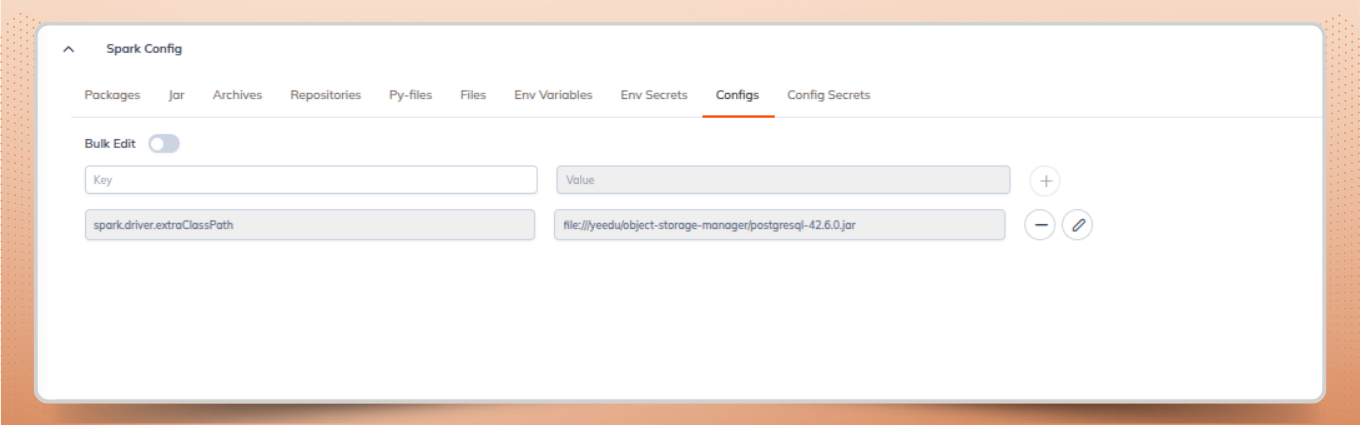
Spark Configurations

Step 4: Retrieve JDBC Details from Yeedu UI

After the cluster is up and running, Yeedu automatically provisions a Spark Thrift Server.

Accessing the JDBC Section

  1. Open the Clusters Dashboard in the Yeedu UI
  2. Select the required cluster
  3. Scroll down to the JDBC section

The following connection details are displayed for establishing a Spark JDBC connection:
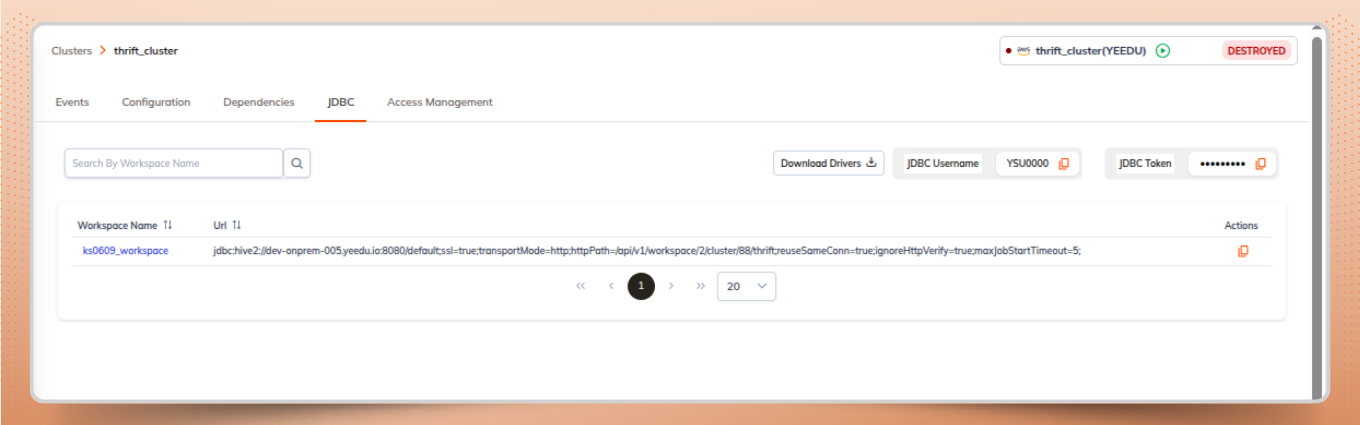
  • Workspace Name
    • Indicates the workspace where the thrift job is running
  • JDBC URL
    • The connection string required to connect to the Spark Thrift Server
  • Download Drivers
    • Provides the custom Yeedu Thrift JDBC driver JAR
    • Can be used with tools such as DBeaver, Beeline, or other JDBC clients
  • JDBC Username
    • Username used for authentication
  • JDBC Password
    • Password used for authentication
JDBC tab
JDBC tab

Step 5: Connect Using a JDBC Client

Yeedu Thrift can be accessed using any JDBC-compatible SQL client that supports Apache Spark SQL Thrift.

Example: Connecting with DBeaver

  1. Download the Yeedu Thrift JDBC Driver from the JDBC section in Yeedu
  2. Open DBeaver and create a new JDBC connection
  3. Select a generic JDBC or Spark Thrift connection type
  4. Provide the following details:
    1. JDBC URL
    2. Username
    3. Password
    4. JDBC Driver JAR
  5. Test the connection and connect

Once connected, you can execute Spark SQL queries directly from the client via the managed Spark Thrift Server.
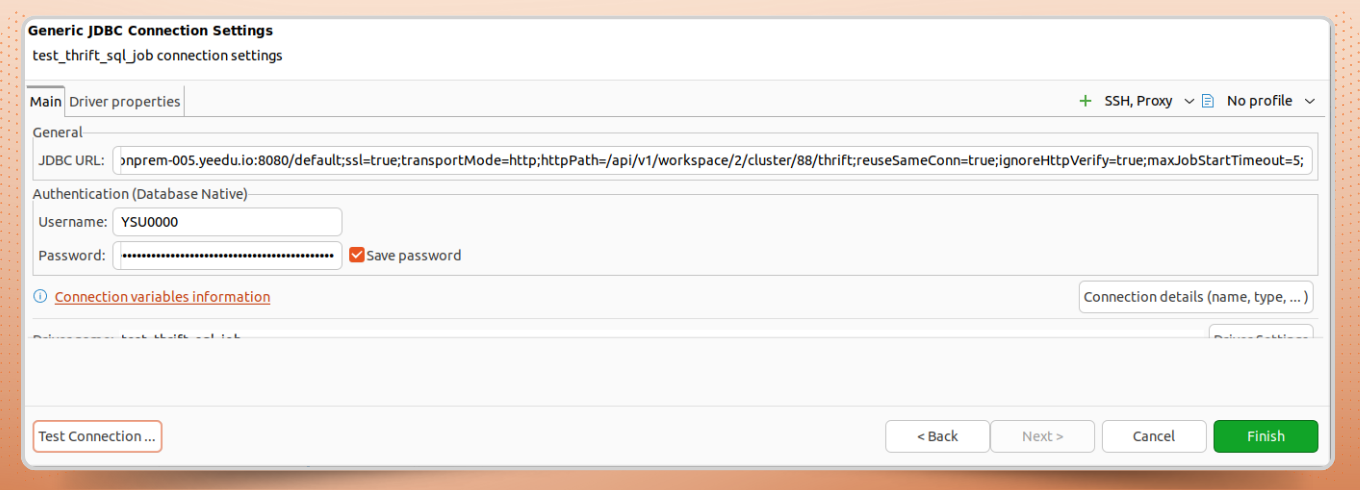
Dbeaver setup
Dbeaver setup

Step 6: Performing Queries in DBeaver Submits a Thrift Job in Yeedu

After the setup is done:

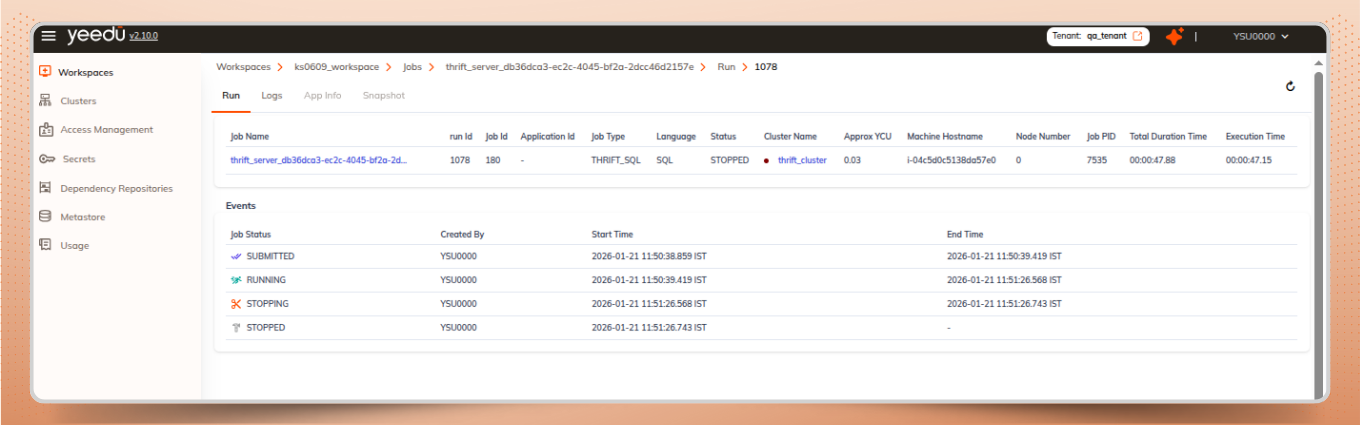
  • Click on Test Connection or performing any queries submits a thrift job
  • Each query is executed as a job on the Spark Thrift Server
  • We can trac the executed job in the Runs tab.

Benefits of Using Yeedu Thrift

Runs tab
Runs tab

Conclusion

Yeedu Thrift simplifies running SQL workloads on Spark by combining a managed Spark Thrift Server with workspace-level security and centralized metadata management. With a standalone Hive Metastore, minimal Spark Thrift Server configuration, and built-in JDBC support, teams can efficiently query data using familiar SQL tools while leveraging Apache Spark SQL Thrift for distributed execution. This approach enables both interactive analytics and production-grade SQL workloads with minimal operational overhead.

Join our Insider Circle
Get exclusive content crafted for engineers, architects, and data leaders building the next generation of platforms.
Thank you! Your submission has been received!
Oops! Something went wrong while submitting the form.
No spam. Just high-value intel.
Back to Resources