
Meet Assistant X - an AI-powered debugging companion specifically designed for users working on the Yeedu. Assistant X transforms the traditional debugging experience into an intuitive, conversational process, bringing new capabilities in Spark job debugging and intelligent analysis.
The Spark Debugging Challenge
Spark developer's generic challenges:
- Complex Error Traces: Stack traces that span hundreds of lines with obscure JVM errors
- Performance Mysteries: Jobs that suddenly slow down during Spark job execution
- Resource Allocation Puzzles: Memory errors, executor failures, and cluster resource conflicts
- Time-Consuming Investigation: Hours spent correlating logs, metrics, and configuration files
Traditional tools provide raw data but lack the intelligence to connect the dots and provide actionable insights for debugging Spark code.
Enter Assistant X: Your Intelligent Debugging Partner
Assistant X doesn’t just surface information - it understands context, analyses patterns, and provides human-readable explanations for complex Spark issues. It acts as a AI Spark debugging assistant, designed to accelerate both investigation and Spark job optimization.
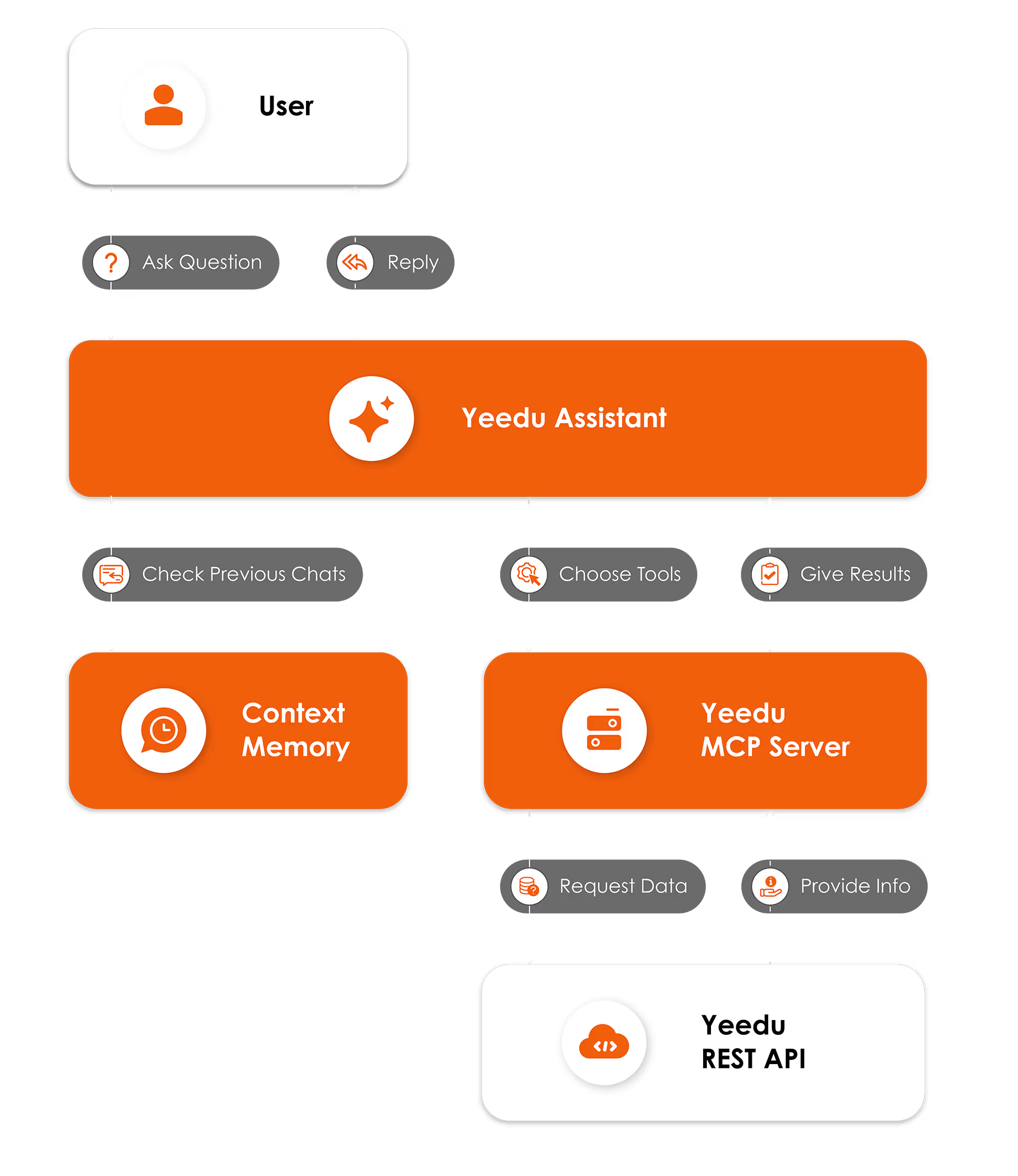
Exhibit A: Yeedu AI Architecture
Conceptual Architecture Flow
User Query → Claude/ChatGPT AI → MCP Tools → Yeedu APIs → Response Processing → User
Core Capabilities
1. Conversational Error Analysis
Instead of parsing raw logs, simply ask:
- “Why did my job fail?”
- “What caused the out of memory error in run 12345?”
- “My job is running slow - what’s wrong?”
Assistant X automatically:
- Retrieves job configuration and runtime details
- Performs deep log analysis on STDOUT/STDERR
- Examines cluster resource allocation
- Identifies root causes and provides specific solutions, dramatically improving Spark job debugging workflows.
2. Contextual Recommendations
Rather than generic advice, Assistant X provides workspace-specific recommendations:
- Optimal memory configurations for your cluster size
- Suggested parallelism levels based on data volume
- Package dependencies that might resolve compatibility issues
- Code-level improvements that supports Spark job optimizations
3. Natural Language Interaction
No need to remember complex query syntax or parameter names:
- “Show me all failed jobs from last week”
- “Which workspace has the most expensive compute usage?”
- “Find jobs that failed with memory errors”
Assistant X translates natural language into actionable platform operations, offering a smoother Spark job execution view across clusters.
4. Auto completion of code
- It suggests/auto complete the code inside a notebook
- It diagnoses the error and gives required solution
Real-World Spark Debugging Scenarios
Scenario 1: The Mysterious Memory Error
Developer Query: “My job 15847 keeps failing with OutOfMemoryError”
Assistant X Analysis:
- Performs deep Spark log analysis
- Reviews historical runs for optimization patterns
- Recommends specific memory tuning for Spark job optimization
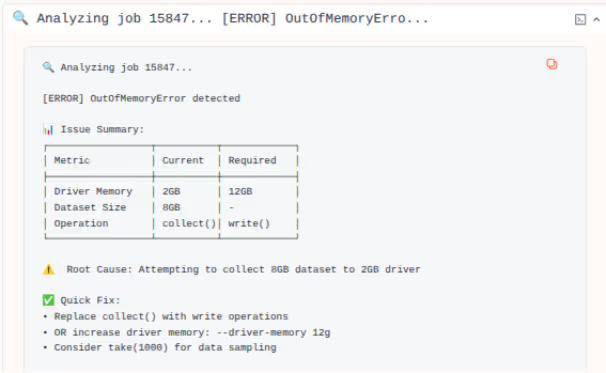
Exhibit B: Scenario 1 analysis
Scenario 2: Performance Degradation
Developer Query: “Why is my job suddenly 10x slower?”
Assistant X Analysis:
- Analyzes cluster metrics and execution logs
- Highlights inefficient stages causing slow Spark job execution
- Suggests code-level and configuration-level fixes for Spark job optimization
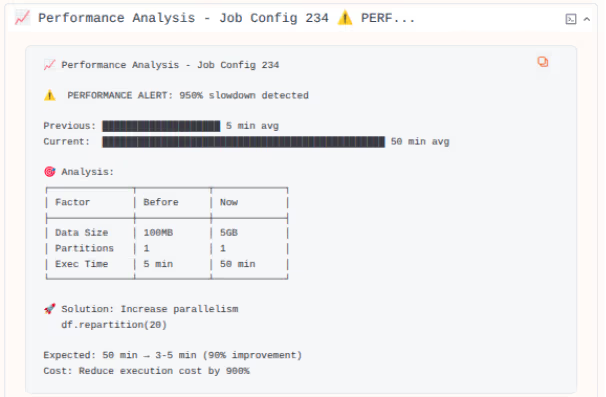
Exhibit C: Scenario 2 analysis
Exploring and Understanding Your Yeedu Environment
Assistant X helps you make sense of your Yeedu world: tenants, workspaces, files, jobs, notebooks, and more with added context-awareness of an AI Spark debugging assistant.
1. "What workspaces do I have?"
Don't remember workspace IDs or names? Ask:
- "Show me my workspaces."
- "Which workspaces do I have access to?"
- "What's going on in workspace 42?"
Assistant X can:
- List your workspaces
- Help you search for a workspace by name or keyword
- Summarize a workspace with things like:
- How many jobs and notebooks it has
- Recent activity
- High-level job statistics
2. Browsing workspace files
Inside a workspace, you can ask:
- "What files are in this workspace?"
- "Show me the notebooks under /analytics/monthly."
- "Open the contents of etl/users_daily.sql."
Assistant X can:
- Browse directories
- Show you which files/notebooks exist and where
- Fetch the contents of a file and explain what it does in plain language
This is especially helpful when you're new to a workspace or taking over someone else's project.
3. "What can I do in this workspace?"
Permissions can be confusing. Assistant X can check your workspace permissions and explain them simply:
- "Do I have permission to edit jobs in this workspace?"
- "Why can't I run this job?"
- "What role do I have here?"
It maps technical permission names into simple, human-readable explanations like:
"You can run jobs but you can't edit their configuration."
Building and Managing Spark Jobs with Assistant X
Assistant X can be your assistant for the entire job lifecycle: create → edit → run → monitor → debug.
1. Discover your jobs
Ask:
- "Show me the jobs in this workspace."
- "Find jobs related to 'daily billing'."
- "What does the customer_retention_job do?"
Assistant X can:
- List jobs in a workspace
- Search by keywords in job names or descriptions
- Open a job's configuration and explain it in simple terms:
- Type of job (notebook, Spark, SQL, etc.)
- Inputs/outputs (tables, files, etc.)
- Key parameters
2. Guided job creation
Not sure how to define a job spec in one go? You can say:
- "I want a job that loads CSVs from S3 and writes them into a Delta table."
Assistant X can:
- Ask you a few interactive questions (cluster, input paths, output tables, etc.)
- Build a job configuration based on your answers
- Show you the final spec in a human-friendly way before creating it
You don't have to memorize every field in a job config page – the assistant walks you through it.
3. Editing jobs safely
When you want to change something:
- "Switch this job to use the specific cluster."
- "Optimize my job code"
Assistant X can:
- Read the current job configuration
- Propose a clean change (and explain what's changing)
- Apply the update after you confirm
- Warn you if a change might impact existing runs (for example, changing schedule on a heavily used job)
4. Triggering jobs on demand
Need to run a job right now?
- "Run this job once with runtime config(“spark.sql.shuffle.partitions=10”)"
- "Trigger the monthly billing job for a backfill."
Assistant X can:
- Start the job run
- Tell you when it has started and what run ID to look for
- Guide you to the run page to monitor progress
Each of these steps leverages knowledge from Spark log analysis and past runs to enhance Spark job execution reliability.
The "Diagnose" Button
A key strength of Assistant X is its advanced Spark job debugging engine built into the Diagnose button: When you click it:
- Assistant X reads the run's logs and system errors
- It looks for root causes (missing tables, permission issues, cluster problems, bad configs, etc.)
- It explains what likely went wrong
- As an AI Spark debugging assistant, it suggests specific fixes, such as:
- “Create this missing table or change the table name."
- "Increase cluster memory; your job ran out of memory."
- "You don't have permission to write to this path; ask an admin or use another location."
For clusters in error state also get a Diagnose feature in the UI. When you click Diagnose on a cluster:
- Assistant X inspects cluster logs and system errors
- It summarizes what went wrong
- It suggests next actions such as:
- Changing instance type
- Adjusting configuration
- Checking permissions or network settings
Assistant X in Notebook:
Inside notebooks, Assistant X becomes your Notebook Companion. It has deep understanding of:
- Your current cell
- The rest of the notebook code
- Recent queries or commands you ran
- The operation you're performing (e.g., diagnose-error, generate-code, etc.)
Here's what it can help you with.
Auto-complete while you type
As you write code in a cell, Assistant X can suggest:
- Next lines of Python, SQL, or Spark code
- Helper functions
You stay in flow instead of hunting for examples.
Explaining and fixing errors
When a cell fails, you can:
- Click on Diagnose (or)
- Ask: "Why did this cell fail?" / "Explain this error."
AssistantX will:
- Look at the error message
- Read the current cell and related cells
- Tell you what the error means
- Suggest corrected code
Understanding Billing and Usage
Assistant X also helps you understand your costs.
You can ask things like:
- "Show me my usage for the last 30 days."
- "Which clusters are costing me the most?"
- "Why was my bill higher this month than last month?"
These often tie back to poor or missed Spark job optimization opportunities.
Assistant X can:
- Pull billing usage data for a date range
- Break down usage by time period or resource
- Highlight patterns (e.g., "Costs increased mainly due to cluster X running longer jobs.")
This awareness makes Spark job debugging instantaneous.
Screen-Aware Help: Assistant X Knows Where You Are
A powerful new capability is screen context.
Assistant X is aware of which page you're on in the Yeedu UI:
- Cluster page
- Workspace page
- Job configuration page
- Job run page
- Notebook page, etc.
This means you can just say:
- "What's wrong with this job?" from the job run page
- "Can I run jobs in this workspace?" from a workspace page
- "Is this cluster healthy?" from the cluster view
You don't have to provide IDs or URLs – Assistant X already knows what "this" refers to.
Technical Architecture
Deep Integration with Yeedu Platform
Assistant X seamlessly integrates with Yeedu’s ecosystem:
- Real-time monitoring of job runs and cluster health
- Historical Spark log analysis of performance trends
- Cost optimization recommendations in YCU (Yeedu Compute Units)
- Multi-workspace debugging across development environments
Before Assistant X:
- Job fails with cryptic error
- Download and parse lengthy log files
- Cross-reference with Spark documentation
- Trial-and-error configuration changes
- Repeat cycle until resolution Time to resolution: Hours to days
With Assistant X:
- Job fails
- Ask: “What went wrong with job run 12345?” (or) Click on Diagnose
- Receive detailed analysis with specific solutions
- Apply recommended fixes
- Job runs successfully Time to resolution: Minutes
Spark Performance Optimization
- Identifies inefficient transformations before they impact production
- Suggests optimal cluster configurations for specific workloads
- Recommends code refactoring for better resource utilization
Security & Trust: AI + Yeedu Integration
Core Security Principles
- No Data Storage: The AI doesn’t retain or store any code, data, or configurations after conversations end
- Session-Based Access: All API calls are made in real-time during active sessions - no persistent connections or cached data
- Read-Only Analysis: The system analyses existing data but cannot modify, delete, or export without explicit user commands
- Scoped Permissions: Access is limited to specifically requested items - workspace files, job logs, cluster stats, etc.
Built-in Safeguards
- Authentication Required: All Yeedu API access requires pre-configured user authentication tokens
- Request-Response Model: Fresh API calls are made for each query - no background data collection occurs
- Visible Actions: Every tool execution is displayed in real-time with full transparency
- Limited Scope: Access is restricted to Yeedu platform data the user has permissions
System Limitations
- Cannot store user code, credentials, or data beyond current conversations
- Cannot share information with other users or external systems • Cannot modify production systems without explicit user commands
- Cannot access data outside authorized Yeedu workspaces
User Control Mechanisms
- Selective Sharing: Users choose exactly which workspaces, jobs, or clusters to analyze
- Command Approval: The system requests confirmation before potentially impactful actions
Key Guarantees
- No Persistent Storage: User data exists only during active conversations
- No Cross-Contamination: Workspace data never mixes between different users
- No Backdoors: Only official Yeedu APIs with user permissions are utilized
- No Hidden Actions: All operations are visible and explainable
Supported AI Models Spark Debugging
Below are the currently supported Claude and ChatGPT model variants available for use.
1) Claude
- Sonnet-4.5
- Sonnet-4
- 3-7-Sonnet
- 3-5-Sonnet
- 3-5-Haiku
- 3-Opus
- 3-Haiku
2)ChatGPT
- 4o
- 4o-mini
- 4.1
- 4.1-mini
- 4.1-nano
- 4-turbo
Conclusion
Assistant X represents a paradigm shift in Spark development from reactive debugging to proactive Spark job optimization, from cryptic error messages to clear, actionable insights. By combining deep technical knowledge with intuitive interaction patterns, it empowers developers to focus on building great data applications rather than wrestling with infrastructure complexities.
Ready to transform your Spark debugging experience? Assistant X is available now on the Yeedu your new AI Spark debugging assistant for faster, smarter, and more reliable bold spark job execution.
Further Links: