
Apache Spark vs DuckDB is a question about address space, not popularity or age. Spark distributes a job across a driver and a fleet of executors connected over a network; DuckDB runs the entire query inside one process on one machine, and by default claims up to 80 percent of that machine’s detected RAM before it spills to disk. The right choice follows from whether the job’s working set, the data actually touched, fits inside that single-process budget or has to spread across a cluster.
On the distributed side of that line, teams run Spark directly or through a managed platform such as Databricks or Amazon EMR, or through Yeedu, which re-engineers the Spark execution layer and runs inside a customer’s own cloud account rather than selling a new platform. On the single-node side, DuckDB is often paired with a managed layer like MotherDuck, or set against Polars Cloud, which keeps Polars single-machine-first but adds a distributed option once a job outgrows one VM. None of these replaces the others outright: an Apache Spark vs DuckDB decision is usually made job by job, not estate by estate.
That difference in process model drives everything that follows: how each engine scales, fails, starts up and bills for compute. In this guide, we work through the Apache Spark vs DuckDB architecture, the execution engines, the operational tradeoffs and the cost mechanisms on both sides, then lay out a checklist for picking one engine for one job.
Apache Spark vs DuckDB at a Glance
Below, we sort the two engines by the dimensions that actually change how a job behaves in production, from deployment model down to who maintains it day to day. Every cell comes from the project’s own documentation.
| Dimension | Apache Spark | DuckDB |
|---|---|---|
| Deployment model | Driver plus a cluster manager (YARN, Kubernetes or standalone) allocating executors | Embedded in the host process, no server to install |
| Unit of execution | Tasks inside executor processes, scheduled across stages | Threads inside one process, scheduled against vectorized pipelines |
| Where the data lives | Partitioned across executor memory and disk on multiple machines | In memory and local disk of a single machine |
| Scale ceiling | Bounded by cluster memory and cores | About 80 percent of one machine’s RAM by default, plus disk for spilling |
| Startup latency | Driver and executors register before work begins | Ready as soon as the library is imported |
| Concurrency model | Many jobs share a cluster or warehouse, scaled across many clusters | One process, multiple writer threads, MVCC plus optimistic concurrency |
| Fault tolerance | Tasks retry (spark.task.maxFailures, default 4); stages recompute from lineage | A failure ends the process; the client restarts the query |
| Language and API surface | Scala, Java, Python, R and SQL APIs | SQL and a Python relational API, plus an experimental PySpark-syntax shim |
| Streaming | Structured Streaming, on the batch DataFrame API | Not a streaming engine |
| ML | MLlib, plus a connector ecosystem | No native distributed ML library |
| Governance and catalog | Hive Metastore, Unity Catalog or AWS Glue | Reads files directly from storage; no built-in catalog |
| Cost model | Cluster or warehouse compute time, plus a per-unit fee | Whatever compute already hosts the process |
| Operational burden | Cluster sizing, shuffle and memory tuning | Setting memory_limit and temp_directory |
That comparison is the backbone of everything we cover in this guide.
Architecture and Execution Engines
Architecture and execution engines explain why these two engines diverge so sharply in practice, because each one was designed around a different unit of hardware from the start. Spark assumes the job will outgrow one machine and builds in coordination for that case; DuckDB assumes the job fits in one process and optimizes for the absence of coordination.
Spark: Driver, Executors, Partitions and Stages
A Spark application runs as a driver process holding the SparkContext, which connects to a cluster manager, standalone, YARN or Kubernetes, that allocates executors on worker nodes, per the Spark documentation. The driver has to stay network-addressable from every executor for the life of the app, which is why Spark’s own docs call out running it close to the workers, on the same local network, as a deploy constraint rather than a suggestion. Deploy mode decides where that driver actually runs: cluster mode launches it inside the cluster, client mode launches it outside. Work splits into partitions, groups into stages at each shuffle boundary, and schedules as tasks onto executors; Catalyst plans the query, and Tungsten manages off-heap memory and generates whole-stage code so a chain of operators compiles into one tight loop instead of calling through row-at-a-time iterators.
DuckDB: A Single Process, Vectorized and Out-of-Core
DuckDB is the single-process side of the Apache Spark vs DuckDB split: it does not run as a separate process at all, and it is embedded directly inside the host process, with no DBMS server to install, update or maintain, per DuckDB’s own documentation. Its columnar engine executes in vectorized batches and supports parallel execution across every thread available to that one process, including larger-than-memory workloads on a single node. There is no cluster manager because there is no cluster: parallelism comes from threads inside one address space, not processes spread across machines. Out-of-core execution, spilling grouping, joining, sorting and windowing operations to local disk once memory runs out, is what lets DuckDB handle a dataset larger than RAM without ever leaving that one process.
Both engines are columnar and vectorized where it counts, in the operators that actually scan and transform rows, so calling either one unvectorized is simply wrong. The real difference between them is coordination overhead, not raw execution technique.
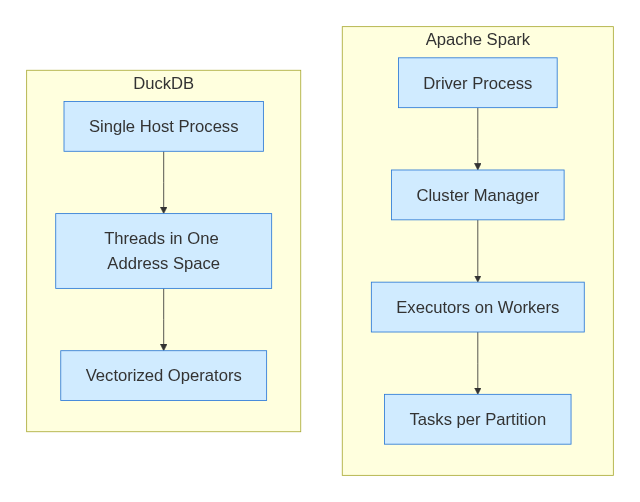
Spark cluster architecture vs DuckDB single process
Shuffle and the Sizing Crossover
Shuffle is the mechanism that lets a distributed engine exceed the limits of a single machine, and it is also the single biggest cost difference between running on a cluster and running inside one process. Any join or aggregation that needs rows currently sitting on different executors has to redistribute them across the network first, writing shuffle blocks for remote reducers to fetch.
Spark’s default for that redistribution, spark.sql.shuffle.partitions, is 200, and Adaptive Query Execution, on by default since Spark 3.2.0, can coalesce or split those partitions at runtime based on spark.sql.adaptive.advisoryPartitionSizeInBytes, which defaults to 64MB, and spark.sql.adaptive.coalescePartitions.minPartitionSize, which defaults to 1MB. Skewed partitions can split or replicate automatically through spark.sql.adaptive.skewJoin.enabled, which is on by default and which the Spark docs recommend over hand-written skew hints.
spark.sql.shuffle.partitions=200
spark.sql.adaptive.enabled=true
spark.sql.adaptive.coalescePartitions.minPartitionSize=1MB
spark.sql.adaptive.advisoryPartitionSizeInBytes=64MB
spark.sql.adaptive.skewJoin.enabled=true
That network exchange is where we think a comparison between Spark’s cluster model and DuckDB’s single process has to look first, and it is exactly what DuckDB never has to do. A single process with no partitions to redistribute has no shuffle boundary, no remote fetch and no lost-executor retry to recover from. The tradeoff runs the other way too: there is also no way to add a second machine once the job outgrows the first one, which is the entire reason shuffle exists on the Spark side in the first place.
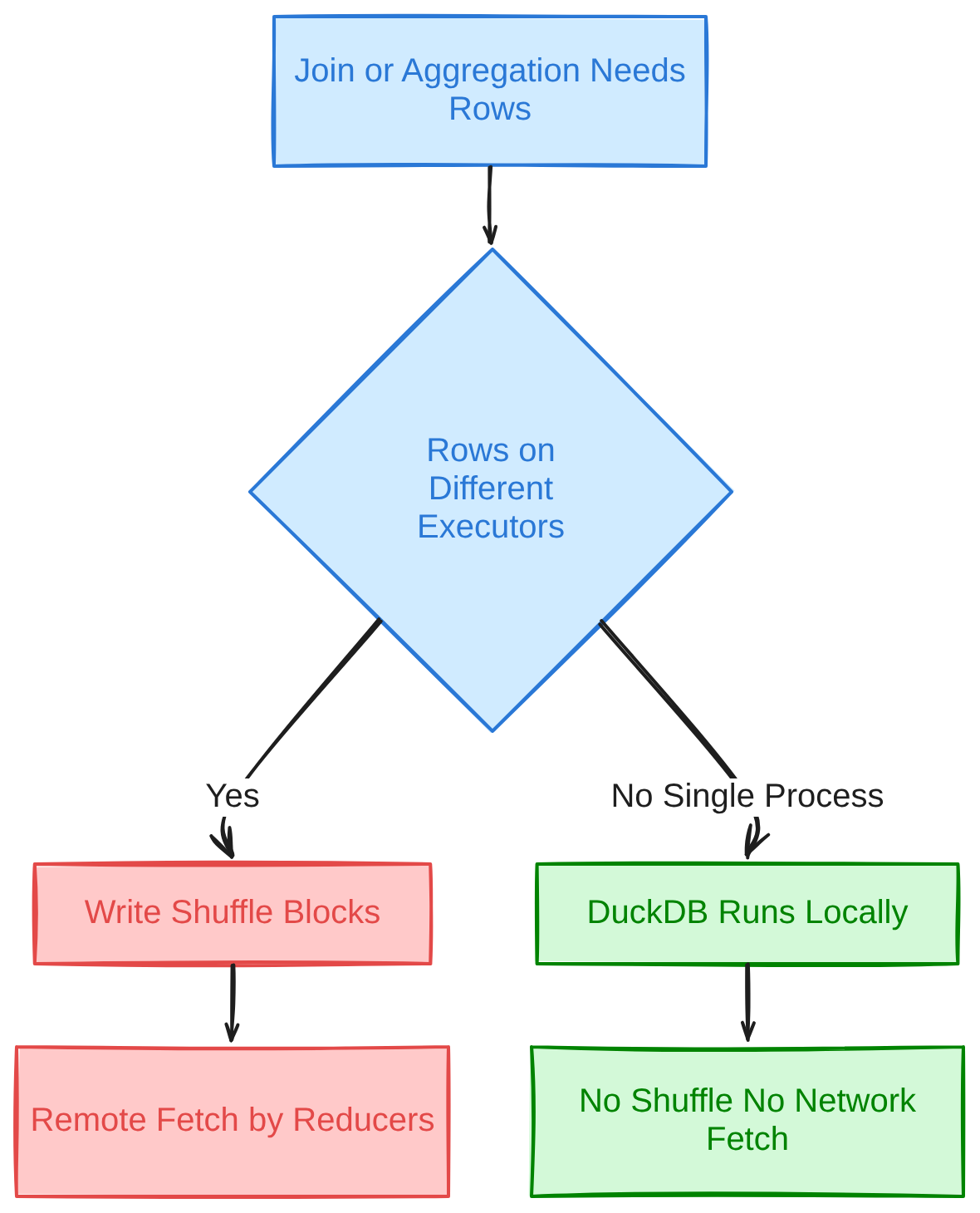
Shuffle path versus single process execution
Estimating the Crossover for a Specific Job
When we work out whether a job belongs on one machine or a cluster, we start with its working set, the data actually read, joined and aggregated during the run, not the size of the full lake it is drawn from. We compare that working set against roughly 80 percent of the RAM on the largest single VM under consideration, DuckDB’s default memory_limit, and leave room for the out-of-core spilling DuckDB gives grouping, joining, sorting and windowing once temp_directory points at fast local storage.
SET memory_limit = '16GB';
SET temp_directory = '/fast/nvme/duckdb_tmp';
-- default memory_limit is about 80% of detected RAM
-- out-of-core spill covers: grouping, joining, sorting, windowing
DuckDB’s own documentation is direct about where that headroom runs out: multiple blocking operators, heavy aggregations or a PIVOT can still exhaust memory, and so can a dataset that is simply very large relative to what is available, regardless of the spill settings. Cloud providers keep raising how much RAM, how many cores and how much local NVMe a single VM offers, which keeps moving that crossover upward, but exact specs vary by provider and generation and are worth checking against the current instance catalog before sizing a job around them.
Startup Latency, Concurrency and Reliability
Startup latency, concurrency and reliability are the operational differences a team feels first in production: they shape the development loop, who else can use the engine at once, and what happens when something fails mid-run.
Startup Latency and the Development Loop
A Spark job cannot start work until the driver and executors are up and registered with the cluster manager, a sequence that exists on every run regardless of query size. DuckDB has nothing equivalent to wait for: the engine is ready as soon as the library is imported, because there is no server to provision. That gap matters most for short, frequent jobs and for CI, where a two-minute query can spend most of its wall-clock time waiting on infrastructure rather than computing anything.
Concurrency and Multi-User Access
Spark clusters and the SQL endpoints built on them are designed to serve many jobs and users at once. Databricks, for instance, documents sizing roughly one cluster per 10 concurrent queries, scaling a single SQL warehouse across as many as 40 clusters, and queuing up to 1,000 queries. DuckDB’s concurrency model stops at one process: threads can update separate tables, or disjoint parts of the same table, using MVCC and optimistic concurrency control, but the database file itself is locked for writes once more than one process reaches it. That suits a single analyst’s session or pipeline step, not a shared, always-on service with many independent writers.
Reliability and Fault Tolerance
Spark’s fault tolerance assumes something will fail during a long job. A task fails and retries up to spark.task.maxFailures times, four by default; a slow task can be speculatively re-run on another executor; a lost stage recomputes from RDD lineage instead of restarting the whole application. DuckDB has no equivalent: a failure ends the process, and the client reruns the query from scratch. For a six-hour Spark job, that difference is why it finishes at all on a cluster that occasionally loses a node; for a two-minute DuckDB query, restarting costs about what the retry logic would have anyway.
API and Portability
API and portability questions usually come down to one thing: whether code written for one engine runs, unchanged, on the other. The honest answer is mostly no, with one narrow exception DuckDB documents itself.
Spark’s primary interface is the DataFrame and SQL API, available from Scala, Java, Python, R and plain SQL, all compiling down through Catalyst and Tungsten regardless of which language wrote the query. DuckDB’s primary interface is SQL and a Python relational API that executes directly against its own engine, with no driver or executor underneath it. Both of the snippets below answer the same question we chose, the ten highest-spending customers, and both read Parquet directly; neither one runs on the other engine without a rewrite.
# Apache Spark (PySpark DataFrame API)
df = spark.read.parquet("s3://bucket/events/")
result = (df.groupBy("customer_id")
            .agg({"amount": "sum"})
            .orderBy("sum(amount)", ascending=False))
result.show(10)

-- DuckDB (SQL, in-process)
SELECT customer_id, SUM(amount) AS total
FROM read_parquet('events/*.parquet')
GROUP BY customer_id
ORDER BY total DESC
LIMIT 10;
DuckDB does document a PySpark-compatible surface, named in its own docs as the DuckDB Spark API. The current documentation marks it experimental, stating it “receives bug fixes only,” that missing features will not be added, and that a future release will deprecate it in favor of a separate project called SQLFrame; it is tested against PySpark 4.2.0 and 3.5.9 specifically, not guaranteed against other versions.
from duckdb.experimental.spark.sql import SparkSession as session
from duckdb.experimental.spark.sql.functions import lit, col

spark = session.builder.getOrCreate()
df = spark.createDataFrame(pandas_df)  # requires pandas installed
That shim translates PySpark-style calls into DuckDB’s own relational-API plans and executes them with DuckDB’s engine. It is a syntax-compatible layer, not a distributed runtime, and existing PySpark code should not be assumed to port over unchanged just because the import statement looks familiar.
Ecosystem and Cost Structure
Ecosystem and cost structure decide what an engine can plug into and what it costs to run that way, and the two connect because a managed platform’s billing model is itself part of its ecosystem.
Structured Streaming and MLlib
Spark ships Structured Streaming, which processes streaming sources through the same DataFrame API used for batch jobs, and MLlib, its distributed machine learning library, both part of the Apache Spark project. DuckDB extends through modules rather than built-in libraries: httpfs for object storage, iceberg and delta for open table formats, and others including spatial, postgres, mysql, sqlite, fts and vss. DuckDB is not built as a streaming engine or a distributed ML platform, and nothing in its documentation claims otherwise.
Catalogs, Delta and Iceberg
Governance on the Spark side usually runs through whichever platform hosts the cluster: Hive Metastore, Unity Catalog or AWS Glue are the common integration points. Delta and Iceberg can meet in the middle of that stack. Databricks UniForm, for example, auto-generates Iceberg metadata alongside a Delta table’s own metadata once delta.universalFormat.enabledFormats is set to iceberg, delta.enableIcebergCompatV2 is set to true and delta.columnMapping.mode is set to name, which Databricks documents as requiring Runtime 14.3 LTS or newer for new tables and Runtime 15.4 LTS or newer to enable UniForm on an existing table, without rewriting the underlying Parquet files.
delta.universalFormat.enabledFormats='iceberg'
delta.enableIcebergCompatV2='true'
delta.columnMapping.mode='name'
# new tables: Databricks Runtime 14.3 LTS or newer
# existing tables: Databricks Runtime 15.4 LTS or newer
Unity Catalog then exposes an Iceberg REST endpoint for UniForm-enabled Delta tables, read-only for that access path, which Spark, Flink, Trino and Snowflake can read from, though Delta tables with Iceberg reads enabled do not support VOID types. DuckDB has no built-in multi-user catalog; it reads Parquet, Iceberg or Delta files directly from object storage through its extensions, and governance is whatever the file layout and object-store permissions already provide.
Cost Structure by Mechanism
The billing unit changes by vendor. Databricks defines its DBU as a normalized unit of processing power, with consumption driven by processing metrics such as compute resources used and data processed, billed per second with cloud storage charged separately. Amazon EMR layers a per-second fee on top of the underlying EC2 and EBS cost for EMR on EC2, while EMR Serverless bills aggregate vCPU-hours and memory GB-hours actually consumed, rounded up to the second with a one-minute minimum.
MotherDuck bills by named compute-instance size per hour, moving to per-second billing above its entry tier, plus a separate charge for stored data by the gigabyte-month. Polars Cloud bills per vCPU-hour of actual execution, with no charge while idle and scale-to-zero when nothing runs. Yeedu’s licensing runs the other direction: a fixed annual fee covers unlimited usage rather than metering compute, so comparing it against a consumption-billed platform is a structural question, not a number either side can win.
None of this says which is cheaper for a given job; that depends on the workload and the contract behind it.
DuckDB vs Spark Benchmarks: Why a Single Number Doesn’t Settle It
DuckDB vs Spark benchmarks exist in plenty, usually built on TPC-H or TPC-DS style decision-support queries, but most of them measure one hardware configuration and one scale factor rather than the full range either engine actually runs at in production.
A benchmark that runs DuckDB on one large machine against Spark on a small cluster is, we’d argue, really measuring two different hardware budgets, not two different engines on equal footing, and the reverse mismatch is just as common and just as misleading. A bare multiplier, three times faster, carries no information without the dataset size, the instance type and the query mix it was measured against. Any DuckDB vs Spark comparison worth citing names its dataset, its hardware and its query shape before it names a number.
The only benchmark that actually settles an Apache Spark vs DuckDB decision for a given team is that team’s own job, run against its own data, on the hardware it would actually pay for either way.
When to Use Apache Spark vs DuckDB
Apache Spark
Apache Spark is the better fit once a job’s working set no longer fits on one machine, once a pipeline runs shuffle-heavy joins across large tables, once streaming volume needs more than one machine’s throughput, once ML needs to distribute across a cluster, or once many teams need concurrent access to the same compute. It is also the safer choice for any job that must survive losing a node mid-run, because task retry and stage recomputation exist for that case.
DuckDB
DuckDB fits analytics sized to one machine: ad-hoc queries over lake files, local development, CI test suites, embedded and serverless analytics, and the small scheduled jobs that, in a lot of estates, are currently holding a cluster open for no good reason. Its out-of-core execution stretches that fit past raw RAM, but the vendor’s own documentation is clear that heavy aggregations, multiple blocking operators or a dataset too large relative to available memory can still exhaust it.
Both, Split by Job
In our experience, most real estates run both, split by job rather than by estate-wide mandate: DuckDB for development and tests with Spark still in production, DuckDB for the small steps in an Airflow DAG and Spark for the large ones, with open table formats such as Delta and Iceberg as the contract that keeps the same data readable from either engine. That per-job decision is easier to get approved than a platform migration, because nothing about the catalog, orchestration or the rest of the pipeline changes for the one job being moved.
| Job or team shape | Fits better on |
|---|---|
| Working set under 80 percent of one VM’s RAM, single user | DuckDB |
| Multi-terabyte join across tables that do not fit one machine | Apache Spark |
| CI pipeline or local development loop, no cluster available | DuckDB |
| Streaming ingestion at volume, many partitions | Apache Spark, Structured Streaming |
| Ad-hoc analyst query over a handful of Parquet files | DuckDB |
| Shared SQL endpoint serving many concurrent users | Apache Spark, through a managed platform |
| Small scheduled job currently holding a cluster open by itself | DuckDB, or Spark on one VM with no cluster to coordinate |
Migration Risk and a Decision Checklist
We’ve found that migration risk runs in both directions whenever a job moves between these two engines, and most of it shows up in parts of the job that were never really about Spark or DuckDB specifically.
Moving a Job from Spark to DuckDB
User-defined functions written against Spark’s execution model do not automatically run inside DuckDB’s process, and code that assumes cluster scale or executor-level parallelism has to be rewritten around a single process. Partitioning schemes designed to spread data across executors stop being useful once everything lives on one machine, and anything that reads from Hive Metastore, Unity Catalog or Glue through Spark’s catalog integration needs its own path to the same data. Orchestration and monitoring built around Spark’s driver and executor metrics have nothing equivalent to watch on the DuckDB side.
Moving a Job from DuckDB to Spark
Code written against DuckDB’s relational API or SQL dialect needs a genuine rewrite, not a recompile, to run on Spark, because the two engines share no execution model underneath similar-looking syntax. A job sized for one machine’s memory needs its partitioning strategy designed from scratch once it must spread across a cluster, and any assumption that the whole dataset sits in one process’s memory has to be unwound before the job can shuffle correctly at cluster scale.
A Decision Checklist for One Job
We find six questions settle most of these decisions for a single job: how large is the working set relative to the largest single machine under consideration; how many concurrent users or jobs need to hit it at once; what is the runtime budget, two minutes or six hours; how much node-failure tolerance does it actually need; what governance or catalog integration must it honor; and who maintains it day to day. A job that fails even one of the first three checks, working set beyond one machine, many concurrent users, or a runtime long enough that node failure is likely, belongs on Spark. A job that passes all six comfortably on one machine is a candidate to move off a cluster, not necessarily off Spark itself, which is where the engine running Spark code becomes a separate choice worth making.
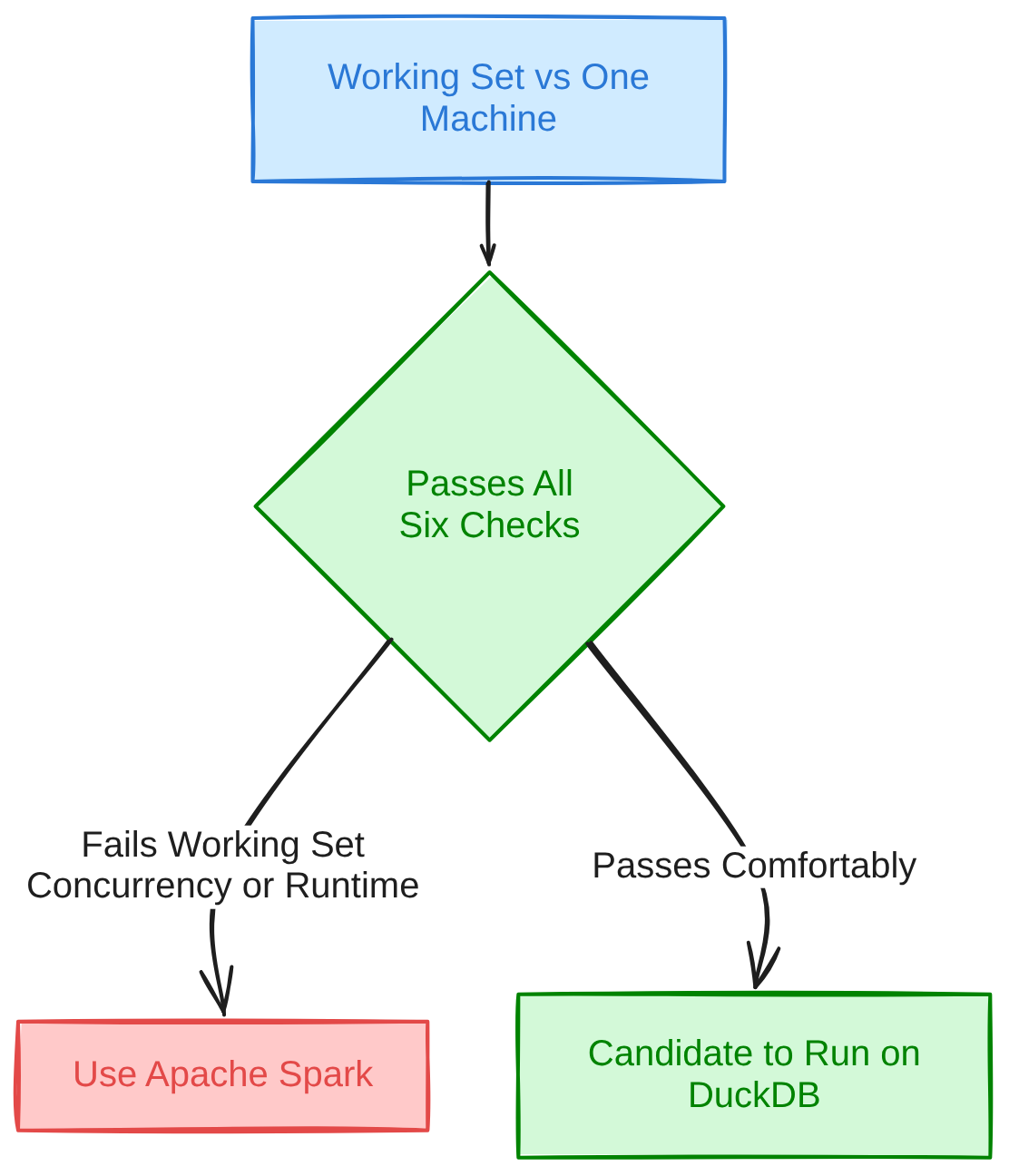
Six-question decision checklist outcome
Where Yeedu Fits When the Answer Is Spark
As we see it, choosing Spark does not end the decision, because the engine that actually executes a Spark job is still a separate choice from the framework itself. Yeedu re-engineers that execution layer and runs it inside a customer’s own cloud account or on-premises servers, adopted one job at a time rather than as a platform migration. Databricks, Cloudera and Amazon EMR are the migration sources named on Yeedu’s product pages: the catalog, notebooks, dashboards and orchestration DAGs stay exactly where they are while individual jobs point at Yeedu instead.
Yeedu mode applies the same single-machine argument DuckDB makes, but to Spark code already written: it runs an entire job on one VM instead of a driver coordinating a fleet of workers, so there is no distributed shuffle at all, no shuffle blocks for remote reducers, no lost-executor fetch failures to recover from. Shuffle is the tax of distributed computing, and it made more sense when a worker node held a few gigabytes of RAM than it does now that a single cloud VM can hold far more. That mode fits jobs that genuinely fit on one VM; a job that needs a cluster still keeps one, and no speedup or cost figure is published for Yeedu mode specifically, so none is claimed here.
DuckDB itself shows up inside Yeedu as a supported notebook language and workload alongside Python, PySpark, SQL and Pandas, so a single-node DuckDB query and a distributed Spark job can sit in the same workspace rather than two separate tools.
Conclusion
Apache Spark and DuckDB solve different problems because they were built around different assumptions about where data lives: spread across a cluster, or sitting in one process, as we’ve shown throughout this guide. Neither is the generally better engine, and the honest version of this decision, as we see it, is scoped to a single job rather than a whole estate.
- Spark distributes a job across a driver, a cluster manager and a fleet of executors, with shuffle as the coordination cost that lets it exceed one machine.
- DuckDB runs entirely inside one process, with no server to manage, and extends its reach past RAM only through out-of-core spilling to local disk.
- Both engines are vectorized and columnar in their hot paths; the real difference is coordination overhead, not whether either one bothered to optimize.
- DuckDB documents an experimental, bug-fix-only PySpark-compatible shim; it is not a distributed runtime and existing PySpark code should not be assumed to port unchanged.
- Cost mechanisms differ by vendor as much as by engine: normalized units, per-second resource billing, instance-hours and fixed licensing are structurally different, not directly comparable without a specific workload.
- Most estates run both engines, split by job size, with open table formats such as Delta and Iceberg keeping the same data readable from either side.
- A six-question checklist, working set, concurrency, runtime budget, failure tolerance, governance and ownership, settles most single-job decisions faster than a platform-wide debate.
FAQs
What is the difference between Apache Spark and DuckDB?
Spark distributes a job across a driver and a cluster of executor processes connected over a network; DuckDB runs the entire query inside one embedded process with no server at all. That distinction decides how each engine scales, starts up, handles concurrency and recovers from failure. Any comparison between the two that skips this point is comparing surface syntax, not architecture.
Is Yeedu an alternative to Apache Spark or DuckDB?
Yeedu is not an alternative to Apache Spark or DuckDB; it is a re-engineered execution layer that runs Spark jobs inside a customer’s own cloud account or on-premises servers, so it sits on the Spark side of this comparison. On its published TPC-DS benchmark run, a synthetic decision-support benchmark, Yeedu completed 99 of 99 queries at a compute cost of $0.52 for 1 TB and $2.33 for 3 TB, figures that describe that run, not a general multiplier against any other engine. Individual Spark jobs can point at it while the catalog, notebooks and orchestration DAGs stay where they are.
Is DuckDB faster than Spark?
It depends on the job and the hardware behind each engine; there is no general answer. For a dataset that fits on one machine, DuckDB avoids shuffle and cluster coordination, which tends to help. For a dataset that needs many machines’ combined memory, the comparison stops being meaningful, because DuckDB cannot run the job as a single process at all.
When should you use Spark instead of DuckDB?
Use Spark once a job’s working set no longer fits on one machine, once the pipeline is shuffle-heavy across large tables, once streaming volume exceeds one machine’s throughput, or once many teams need concurrent access to the same compute. Task retry, speculative execution and lineage-based recomputation also matter for any job long enough that losing a node mid-run is a real risk.
Can DuckDB replace Spark for ETL?
For ETL sized to one machine, yes: DuckDB’s out-of-core execution handles grouping, joining, sorting and windowing past RAM by spilling to local disk. For ETL across a dataset needing a cluster’s combined memory, no, because DuckDB has no distributed execution mode to fall back on.
Does DuckDB support the PySpark API?
DuckDB documents an experimental PySpark-compatible surface it names the DuckDB Spark API, which translates PySpark-style calls into DuckDB’s own relational-API plans and executes them with DuckDB’s engine, not a distributed runtime. The documentation states it receives bug fixes only, that missing features will not be added, and that a future release will deprecate it in favor of a project called SQLFrame, tested against PySpark 4.2.0 and 3.5.9 specifically.
Can DuckDB and Spark be used together in the same pipeline?
Yes: DuckDB handles development, local testing and small steps in a pipeline, while Spark runs the stages that need cluster scale in production. Open table formats such as Delta and Iceberg let both engines read the same underlying data, so the split happens at the job level without duplicating storage.
Can one platform run both DuckDB and Spark workloads?
Yes: a few platforms let a single workspace hold both a single-node DuckDB query and a distributed Spark job. Yeedu’s notebooks support Python, PySpark, SQL, Pandas and DuckDB together, so a team can run its small jobs on DuckDB and its large ones on Spark without switching workspaces. MotherDuck takes a related but different approach, using a hybrid optimizer that decides per query whether to run locally in DuckDB or remotely in its own cloud service.