
Migrating from Apache Spark to DuckDB makes sense for a single job when that job’s working set fits on one machine with room to spare and does not depend on distributed shuffle, streaming or concurrent writers; moving an entire estate rarely does. For jobs that still need Spark’s distributed engine, the pressure behind the question is usually cost rather than row count, and that is answered by how the Spark job is priced and run, not by rewriting it for a single node. Teams weighing this tend to compare four kinds of options: staying on Spark through a managed platform like Databricks or Amazon EMR, moving a job to single-node DuckDB or a hosted version such as MotherDuck, or keeping the Spark code and licensing it through a platform such as Yeedu, which reports a TPC-DS synthetic benchmark of 99 of 99 queries completed at a compute cost of $0.52 per TB at 1 TB scale and $2.33 at 3 TB.
That difference matters because migrating from Apache Spark to DuckDB is really a decision about workload shape, not platform loyalty. Most of the pressure behind the question comes from clusters that sit idle between jobs, Spark’s own startup latency on small interactive queries, and the operational weight of running a scheduler, a metastore and a fleet of workers for something that used to fit on a laptop.
None of that makes DuckDB a stand-in for a cluster. It makes it a sharp tool for the slice of jobs that never needed one.
Why Teams Consider Migrating From Apache Spark to DuckDB
Teams start migrating from Apache Spark to DuckDB for five recurring reasons, and cost sits above all of them: idle cluster capacity, Spark’s cold-start latency, the operational burden of running a scheduler and a metastore, data volumes that never needed a cluster, and a faster local development loop.
Cluster cost is the most common trigger. Managed Spark services meter by the second or by a normalized compute unit multiplied by cluster size and runtime, so an oversized or idle cluster inflates the bill regardless of how much data a job actually touches.
Startup latency adds a second layer of friction. Spinning up executors, negotiating with a resource manager and warming a JVM takes real wall-clock time on every run, which stings hardest on jobs that return in seconds once they finally start.
Operational burden compounds both. One practitioner pipeline ran on a single container with 4 CPUs and 16GB of RAM across 112 assets, with nine of its ten highest-volume tables rebuilding in roughly six minutes after optimization and a 650,000-row outer join completing in about seven seconds, work that would otherwise lean on a scheduler, a metastore and a fleet of workers kept warm. Small and medium data that never needed a cluster, plus a development loop that runs locally, round out the list.
Related Read: Apache Spark vs DuckDB
Migrating From Apache Spark to DuckDB: A Readiness Audit
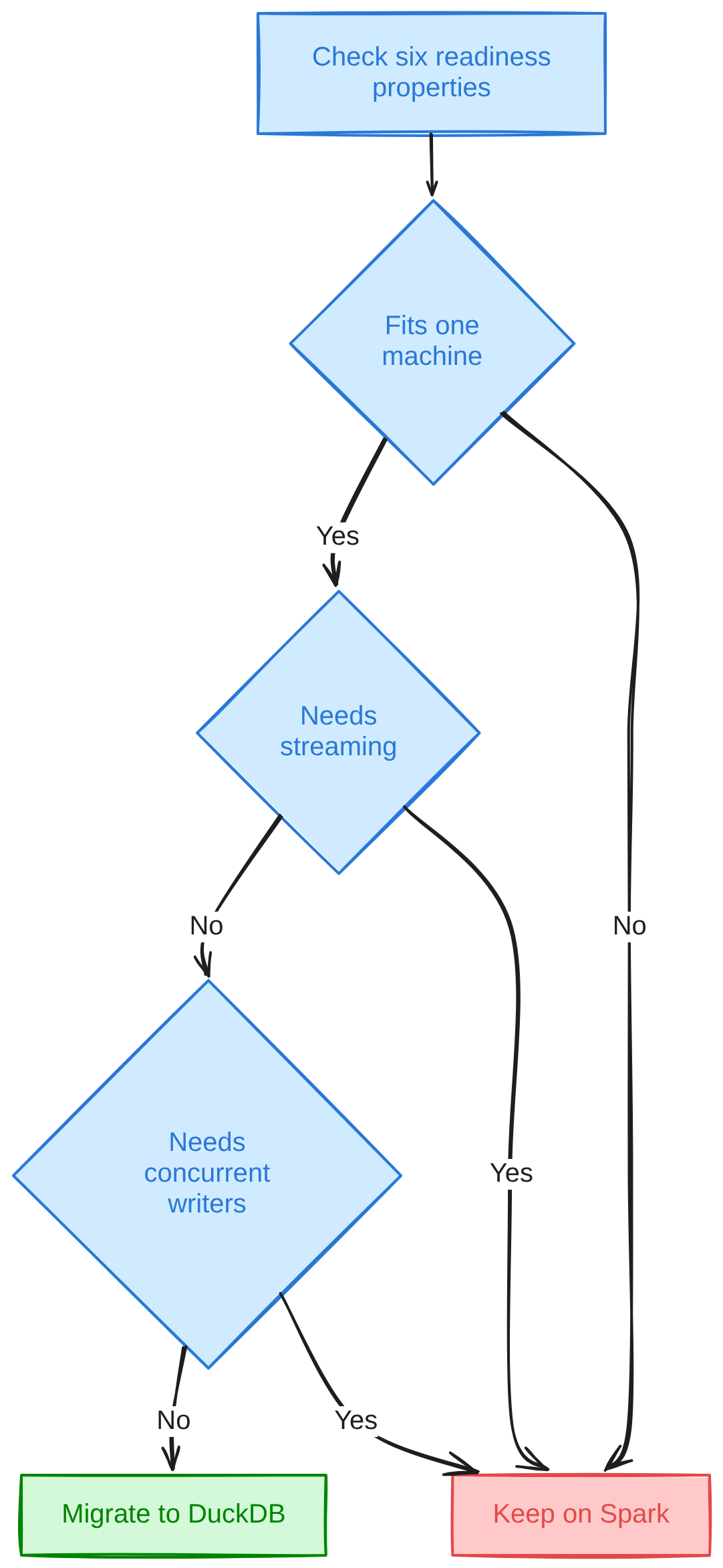
A readiness audit checks six properties of a candidate job before any code gets rewritten: working-set size against single-node memory and disk, concurrency, streaming dependence, UDF and library dependencies, catalog and table-format ties, and scheduling constraints.
Data volume and working-set size
DuckDB’s default memory_limit is 80% of available system RAM, and it spills grouping, join, sort and window operators to a temp_directory on disk once intermediates exceed that limit, bounded by max_temp_directory_size at 90% of remaining disk space by default, per DuckDB’s own memory management documentation. Some aggregates, string_agg() among them, cannot offload their intermediate state to disk and can still exhaust memory on very large inputs, worth checking before a pilot.
Concurrency and write patterns
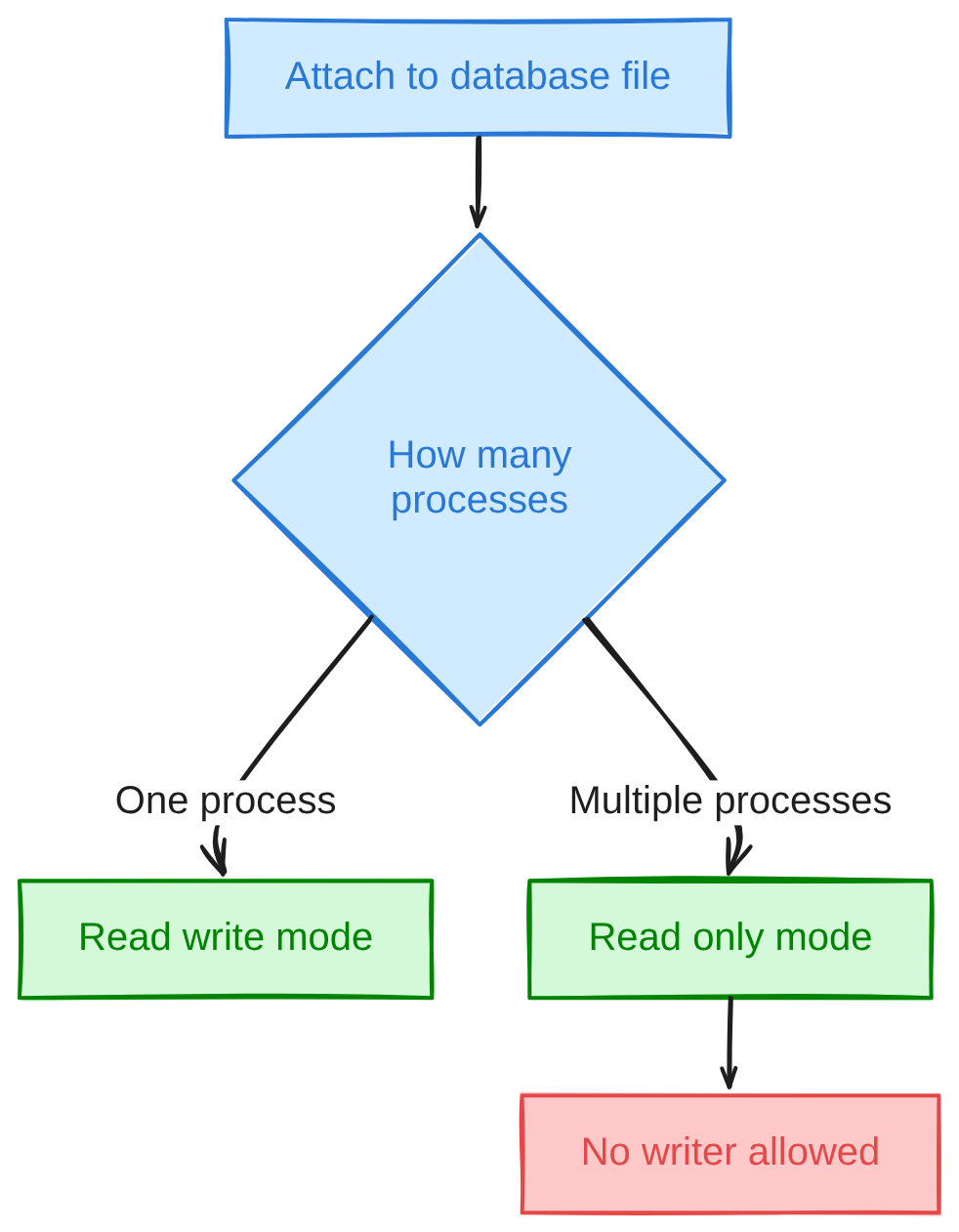
DuckDB’s concurrency model allows exactly one mode at a time: either a single process opens the database read-write and no other process may attach at all, or multiple processes attach concurrently in READ_ONLY mode with no writer present, a real ceiling for jobs with multiple concurrent writers or near-continuous upserts. Spark’s distributed writers carry no such constraint.
Streaming requirements
Streaming is the clearest case where migrating from Apache Spark to DuckDB stops being an option. Structured Streaming jobs lean on checkpointing and a write-ahead log to durable storage to recover offsets and state after a restart, which, combined with a replayable source and an idempotent sink, gives Spark’s default micro-batch engine exactly-once guarantees, per the Spark 3.5.6 documentation. DuckDB has no native streaming engine and no stream-to-stream join support, so a continuous pipeline needs external mini-batching before the data ever reaches it.
UDFs and language dependencies
Python and Scala UDFs, especially ones built against Spark’s DataFrame API or MLlib, need porting rather than a straight lift, because DuckDB’s SQL dialect and Python relational API cover a different surface than PySpark’s DataFrame operations.
Catalog and table-format ties
Jobs governed through Unity Catalog keep that dependency on the Spark side: its column-level lineage runs across tables, notebooks, jobs and pipelines, while its access control and automatic sensitive-data classification apply workspace-wide, and DuckDB has no native equivalent, according to Databricks’ own Unity Catalog documentation. Table-format support is real but young: the Delta extension does not support UPDATE, DELETE, MERGE INTO or concurrent writers, and the Iceberg extension cannot yet read REST catalogs backed by non-S3 storage, both version-pinned to DuckDB 2.0.
Scheduling, orchestration and SLAs
A job’s place in Airflow or Prefect, its SLA window and any downstream dependency on its exact runtime all travel with it during a pilot. Swapping the engine underneath one DAG task is usually smaller than it sounds, provided the DAG does not assume Spark-specific retry or partition behavior.
Collapsing the six checks into one shape-to-recommendation table:
| Job shape | Working set vs. one machine | Recommendation |
|---|---|---|
| Daily batch aggregation over one partition, read-only | Fits well under memory_limit on an available box (e.g. 20GB on a 64GB node) | Migrate to DuckDB |
| Ad hoc analyst SQL, exploratory, under 10GB | Comfortably in memory | Migrate to DuckDB |
| Multi-hour ETL with repeated high-cardinality self-joins at multi-TB scale | Exceeds the largest practical single machine | Keep on Spark |
| Structured Streaming job with checkpointed state and an exactly-once sink | No single-node equivalent exists | Keep on Spark |
| Governed job tied to Unity Catalog lineage or access policy | Governance, not size, is the binding constraint | Keep on Spark, or move only the compute |
| Mixed estate with jobs of every size above | Varies job by job | Hybrid: migrate the jobs that pass the audit, leave the rest |
What Breaks During a Spark to DuckDB Migration
Four things change for a job moving onto DuckDB’s single-process engine: the SQL and API surface it’s written against, how failures are handled, catalog integration, and write concurrency.
SQL dialect and DataFrame API differences
PySpark code built on the DataFrame API, .groupBy().agg() chains, window specs, withColumn calls, does not run unchanged against DuckDB; it gets re-expressed in SQL or against DuckDB’s own Python relational API, which covers a different surface than PySpark’s DataFrame operations. Standard SQL aggregations and joins port cleanly.
User-defined functions
UDFs, especially Python UDFs calling out to external libraries or Scala UDFs compiled against Spark’s internal types, need a direct port rather than a lift, since DuckDB executes them in its own process instead of distributing them across a JVM fleet.
Distributed execution and fault tolerance
DuckDB runs as a single process with no built-in cluster manager, so a failed job reruns from the start rather than recovering a lost executor the way Spark’s driver does. DuckDB’s own troubleshooting guidance warns that when a query’s intermediate state, a hash table for example, exceeds available memory, the query can still run out of memory even though grouping, join, sort and window operators normally spill to disk first.
Catalog integration and write concurrency
Unity Catalog’s lineage, access control and audit logging run across an entire Databricks workspace, and that dependency stays on the Spark side unless the governance layer is re-pointed first. On writes, DuckDB either grants one process exclusive read-write access to a database file or lets multiple processes attach read-only with no writer present, never both at the same time, and the Delta extension matches that caution: it supports CTAS and blind-append writes but not UPDATE, DELETE, MERGE INTO or concurrent writers with transaction versioning.
A Worked Conversion: PySpark Aggregation to DuckDB SQL
A small aggregation job shows the shape of the port without the complexity of a real pipeline: group a Parquet dataset by two columns, sum and average one measure, and write the result back out. A baseline PySpark job reading and writing Parquet:
from pyspark.sql import SparkSession
from pyspark.sql import functions as F

spark = SparkSession.builder.appName("agg").getOrCreate()
df = spark.read.parquet("s3://bucket/events/")
result = (
    df.groupBy("region", "product")
      .agg(
          F.sum("amount").alias("total_amount"),
          F.avg("amount").alias("avg_amount"),
          F.count("*").alias("n"),
      )
)
result.write.mode("overwrite").parquet("s3://bucket/out/")

The DuckDB equivalent, run from the CLI or duckdb.sql() in Python:

-- DuckDB SQL
SELECT
    region,
    product,
    SUM(amount)   AS total_amount,
    AVG(amount)   AS avg_amount,
    COUNT(*)      AS n
FROM read_parquet('events/*.parquet')
GROUP BY region, product;
-- COPY (...) TO 'out/result.parquet' (FORMAT parquet); to persist
The Spark version needs a SparkSession, a cluster or local master, and writes through a DataFrameWriter. The DuckDB version runs the same logic as one SQL statement against read_parquet(), with no session object and no cluster to provision.
A Step-by-Step Migration Plan
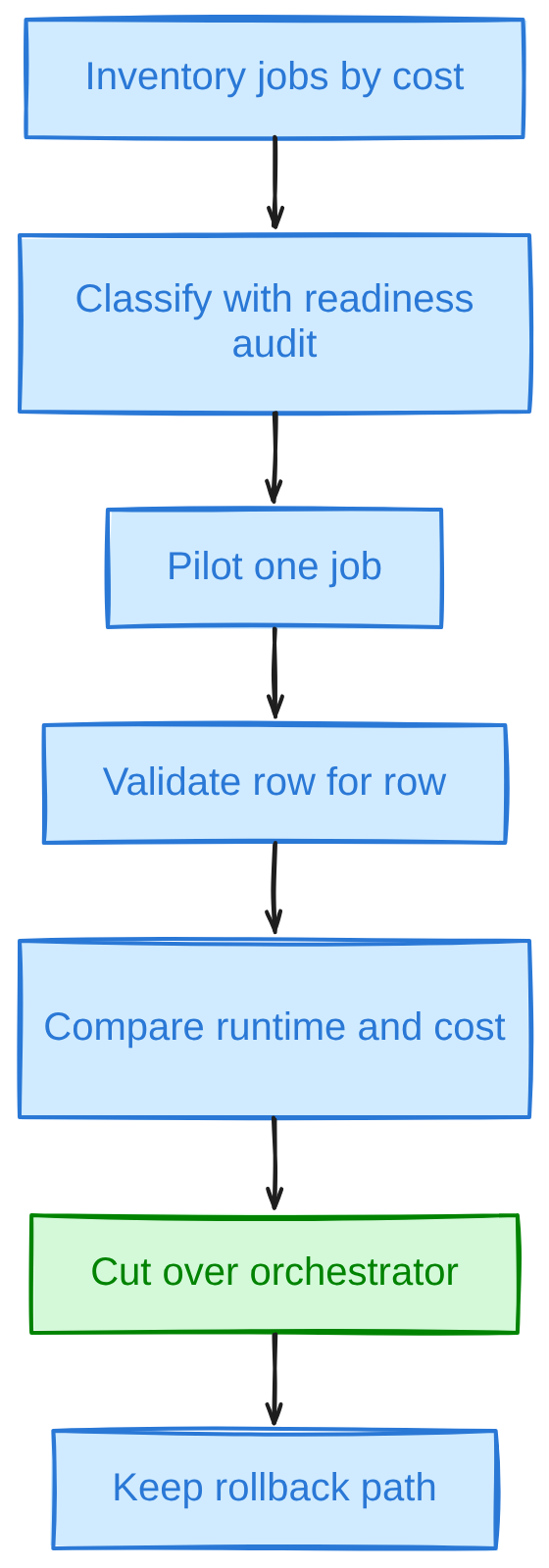
Migrating from Apache Spark to DuckDB succeeds or fails on the strength of the pilot, so a plan for one job runs in seven concrete steps rather than a vague milestone.
1. Inventory
List every Spark job with its weekly compute cost and runtime pulled from cluster event logs or billing exports, sorted highest cost first.
2. Classify
Run each job against the readiness audit above and tag it migrate, keep or hybrid before touching any code.
3. Pilot one job
Pick the smallest high-cost job that passes every readiness check, not the largest one, so a failed pilot costs an afternoon rather than a sprint.
4. Validate row-for-row
Run both engines against an identical, versioned input and diff the outputs row for row, allowing a numeric tolerance such as 1e-9 for floating-point aggregates.
5. Compare runtime and cost
Measure wall-clock runtime and infrastructure cost over at least five production-sized runs, not one, since a single run hides variance from cold caches and neighboring load.
6. Cut over
Point the orchestrator, an Airflow DAG or a Prefect flow, at the DuckDB job once results have matched for two consecutive scheduled cycles.
7. Keep a rollback path
Leave the original Spark job definition in version control and able to run for at least one more cycle, so a regression in production has a known-good fallback.
The Hybrid Pattern Most Teams Land On
Most teams that run this evaluation end up operating both engines side by side rather than picking one: DuckDB for small, interactive or single-node jobs, Spark for large, distributed, streaming or governed ones, both reading the same Parquet, Delta or Iceberg tables out of object storage.
A benchmark comparing DuckDB, Spark with its native execution engine, and Polars across 10GB and 100GB workloads at 4 to 32 vCores found DuckDB roughly 1.6 times faster than Spark at 10GB on 4 cores, but by 100GB and 8 or more cores Spark became the faster engine. At 100GB and 4 cores the two cost about the same, near $0.08; at 32 cores Spark ran 4.5 times faster for twice the cost, shifting cost-efficiency toward Spark as scale grew. The author’s own conclusion treats a full move from one engine to the other as overstated, and recommends routing each job to whichever engine suits its size.
Cost Efficient Spark Platform: Where Yeedu Fits the Cost Gap
A cost efficient Spark platform targets the actual driver behind most of these requests: the Spark bill, not the row count. Yeedu is one such platform: a re-architected Spark execution engine that runs inside a customer’s own cloud account or on-premises servers, built, according to the vendor, to run existing Spark jobs with no code changes. It sits underneath jobs still written as Databricks-, EMR- or Cloudera-style Spark code; the catalog, orchestration DAGs, notebooks and the rest of the estate keep running exactly where they are, because only the jobs pointed at it move, not the platform underneath them.
Yeedu’s Turbo engine reports 4-10x faster execution and 60-80% lower compute cost on CPU-bound Spark stages, joins, aggregations, multi-stage transforms and ML feature prep, which the vendor puts at 30-40% of a typical workload mix. The rest of the mix is not left out: Turbo runs multi-threaded across every available core, Smart Scheduling packs ingestion and streaming tasks into idle I/O-wait windows (a 2-4x efficiency gain the vendor reports for that class of work), spark-submit multiplexing shares a cache across many jobs in one session, and a local Parquet disk cache serves repeat reads without a trip back to object storage.
Pricing is a fixed license with unlimited usage under annual tiers, with no per-core, per-hour or per-job charge. Whether that beats any consumption model depends on a team’s own usage curve, so model it against real job history rather than taking any vendor’s word for it.
Conclusion
Most teams asking whether to migrate from Spark to DuckDB are really asking whether their Spark bill is too high, and those are different questions with different answers. A per-job audit, a small pilot and a row-for-row validation answer the first honestly; the second has more than one answer depending on whether the job in question can leave a cluster at all.
- Audit working-set size, concurrency, streaming needs, UDFs, catalog ties and SLAs before moving anything.
- Migrate jobs that fit on one machine with headroom; leave distributed, streaming or governed jobs on Spark.
- Pilot one job, validate row-for-row, compare cost and runtime over multiple runs, and keep a rollback path.
- Expect a hybrid estate, not a clean cutover, with both engines reading the same open table formats.
- If the real driver is cost rather than job size, a differently priced Spark platform solves that without a rewrite.
- Version-pin any claim about DuckDB’s Delta or Iceberg support; both extensions are still gaining features.
- No engine wins every row; match the engine to the job, not the other way around.
FAQs
Should you migrate from Apache Spark to DuckDB?
Only for individual jobs whose working set fits comfortably on one machine, not as a blanket platform migration. Run the readiness audit above, pilot one job, and compare runtime and cost on real data before deciding anything. For jobs that still need Spark’s distributed engine, a platform such as Yeedu, priced as a fixed license rather than by consumption, addresses the cost motive behind the question without a rewrite.
Can DuckDB handle the same data volumes as Spark?
DuckDB handles large volumes on a single machine, bounded by that machine’s RAM and disk rather than a cluster’s. Its default memory_limit is 80% of system RAM, and it spills grouping, join, sort and window intermediates to disk once that’s exceeded, capped by max_temp_directory_size at 90% of remaining disk space by default. In our experience, that lets it process datasets larger than RAM, though the practical ceiling depends on disk speed and how join- or aggregation-heavy the workload is, not a fixed number.
Is DuckDB cheaper than Apache Spark?
Cost depends on scale and billing model, not a fixed percentage. One practitioner benchmark found efficiency shifting toward Spark as scale grew. The comparison only holds on a team’s own workload.
Can DuckDB read Delta Lake and Apache Iceberg tables?
Yes, through extensions, each with real gaps worth checking before relying on them in production. The Delta extension reads Delta tables including deletion vectors and time travel and writes via CTAS or blind append, but doesn’t support UPDATE, DELETE, MERGE INTO or concurrent writers with transaction versioning. The Iceberg extension supports full CRUD against an attached REST catalog but can’t yet read REST catalogs backed by non-S3 remote storage, as of DuckDB 2.0.
What is a cost efficient Spark platform?
Such a platform runs existing Spark code at a lower infrastructure cost or a more predictable price than a standard distributed Spark setup, without requiring a rewrite. Yeedu is one example: a Spark-compatible execution engine that runs inside a customer’s own cloud account, licensed at a fixed rate rather than per-core or per-hour. The jobs stay Spark code and the rest of the estate stays untouched.
Can DuckDB and Spark run in the same pipeline?
Yes, and most teams that migrate any jobs end up here: DuckDB handling small, interactive or single-node steps and Spark handling large, distributed, streaming or governed ones, both reading the same Parquet, Delta or Iceberg tables from object storage. Orchestrators like Airflow or Prefect can schedule a DuckDB task and a Spark task in the same DAG without either engine knowing the other exists, as long as both agree on the table format underneath.